


The ubiquitous and dreaded “Event log cleared” event record often thwarts forensicators‘ analysis. However, new research by Arctic Wolf® Incident Response analysts indicates that clearing a Windows Event Log does not wipe the underlying Windows Event Log (EVTX) file. Instead, it leaves the “cleared” events behind; ironically, within the very file that was supposedly cleared.
The process is analogous to asking a child to clean his bedroom: rather than removing the mess, he sweeps it under the bed and calls the room clean. This article describes what our analysts found when they looked under the bed.
Investigation Methodology and Findings
During an investigation into a ransomware incident, Arctic Wolf found the threat actor cleared event logs, a technique frequently built into ransomware encryptors. This is not the anti-forensic advantage that ransomware operators assume it to be; log clearing often triggers Endpoint Detection and Response (EDR) or Intrusion Detection System (IDS) alerting and is frequently the very action that allows these systems to identify an attack in progress or prompt an incident investigation.
In this particular case, the encryption binary did not execute without providing the correct password to run it. To reverse engineer the encryptor, analysts required locating the –pass <password> portion of the command line used to execute it. Triage of the domain controller showed that log clearing had affected several logs. Examination of one of the logs, System.EVTX, showed that the final log-clearing event occurred at 16:01 PST, with 104 events logged between 16:01 PST and the time of collection, 17:26 PST. These 104 event log entries were corroborated using Windows Event Viewer, Zimmerman Tools’ EvtxECmd, and Magnet AXIOM. In our testing, we didn’t identify any forensic tool that flags records left in EVTX slack space after a log is cleared. One tool we reviewed can parse events sequentially without relying on the file header, which may surface these records. However, to our knowledge at the time of writing, it doesn’t indicate whether records survived a clearing event or which records predate the clearing event a distinction that is important in investigations involving anti-forensics. Other forensic artifacts indicated that the encryptor had actually run around 12:53 PST, approximately three hours earlier; however, no evidence of this existed in parsed output from the System.EVTX log file.
The full forensic image was also analyzed for additional artifacts. A physical space keyword search for –pass returned the full command-line string for the encryptor, which had been renamed, somewhat unremarkably, to svc-host.exe. The location of this —pass artifact, however, was remarkable: rather than appearing in unallocated space (where cleared log remnants are typically expected), it was found inside the existing and allocated System.EVTX file.
The entry carried a timestamp of 12:53 PST, hours before the final log-clearing event and first reported entry in the System.EVTX. A separate, supposedly cleared, log entry also contained evidence of the threat actor’s use of netscan.exe and a leaked threat actor hostname.
Here’s the problem with that. Most forensic tools do not identify, alert on, or parse EVTX slack space. As a result, relevant data may be overlooked, particularly in ransomware investigations or other cases where log clearing is a common way to conceal activity.
Context
With the release of Windows Vista in 2007, Microsoft replaced the older EVT file format with the newer EVTX format. The new structure of EVTX files allowed for faster loading and querying. Each event is tagged with a sequential record number, and cryptographic protections make it difficult to fake new entries or remove individual entries without detection.
An EVTX file is always at least 68 KB in size: a 4 KB header, plus at least one 64 KB block containing the event data structures. The header specifies the starting and ending record numbers for the events contained in the log. The log may increase to become many gigabytes in size, but is always reset to 68 KB minimum. When a log is cleared, Windows truncates everything after the first 64 KB cluster and resets the first and last record numbers in the log. This does not mean that the remainder of that first 64 KB cluster is empty. In effect, clearing the log merely hides its remaining contents, where they remain, waiting to be found by anyone who knows to look. This means that until enough logs are generated to fill 64 KB, there will always be available data from the previous log file.
However, it is not as simple as just “carving” out the deleted records. To save space in the EVTX file, the file uses substitution templates to fill in repetitive data (hostname, event description, etc.) in each event record. Some unique data will be missing because of this, but very basic information is still available verbatim in the record. Additionally, it is possible to recreate some of these templates accurately, as the templates are mostly standardized by Microsoft.
Detailed Analysis of EVTX Files
For an analyst, forensic tools that parse data are essential to accomplishing work in an efficient and timely manner. But sometimes, manual review of the raw data is required to understand how the tools work and validate their output.
The below screenshot is the 128 byte EVTX Chunk Header (not to be confused with the EVTX File Header, which takes up the first 4096 bytes). All following screenshots and offsets are shown in decimal format.

Figure 1: 128-byte chunk header.
Analysts can speed up manual review by using a feature of X-Ways forensics called “Templates” which highlight areas of bytes based on a preset byte offset. This works well quite while still giving us easy access to confirm raw data from disk, but we still want to verify the results manually.
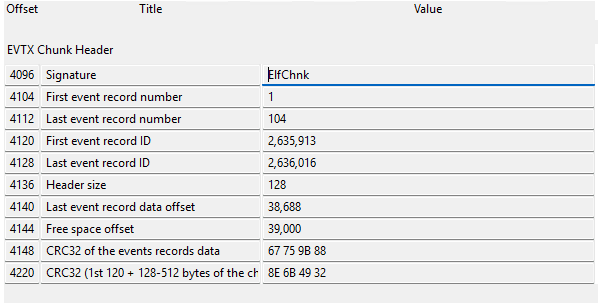
Figure 2: X-Ways forensics template for reading chunk headers.
The highlighted portions below show the starting and ending index numbers. (Note: all bytes are stored in Little Endian.)

Figure 3: At relative offset 8 for 8 bytes, the starting index number (1).

Figure 4: At relative offset 16 for 8 bytes, the ending index number (104).
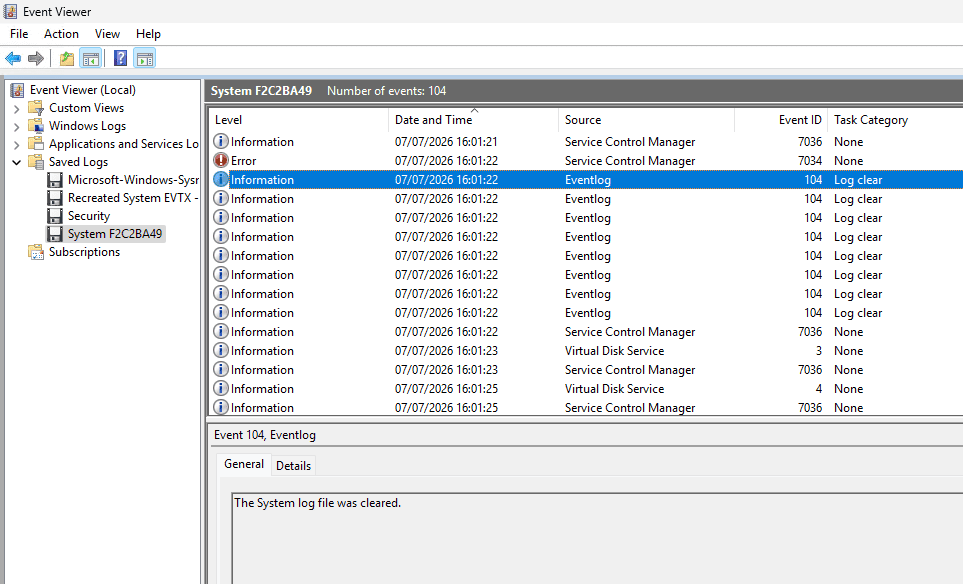
Figure 5: Windows Event Viewer showing 104 events.
Opening the EVTX in Windows Event Viewer shows 104 events, as expected.

Figure 6: First allocated event record with identifier 2,635,913 (decimal, highlighted). Note Windows FILETIME timestamp at offset 16.

Figure 7: Last allocated event record with identifier 2,636,016 (highlighted). Note later file timestamp at offset 16.

Figure 8: First event record in free space. Identifier 2,635,767 (highlighted). Note the earlier timestamp than the first allocated event record, 2026-07-07 16:01:22.

Figure 9: Identifier 2,635,218 (highlighted). Shows netscan activity.
Figure 9 shows evidence of the second log clearing, since this record has an identifier of 2,635,218 and earlier timestamp (12:19:36 as compared to 15:00:48), even though it is later in the EVTA file (offset 53480 as compared to offset 43360). Note the netscan artifact of relevance – which took place BEFORE the clearing of the log, yet is still present and accessible within the EVTX file.
To confirm this hypothesis, analysts reviewed another EVTX file from another incident where log clearing occurred; in this case, the Windows PowerShell EVTX file. The review uncovered only one allocated record, both in X-Ways (Figure 10) and in Windows Event Viewer (Figure 11).

Figure 10: EVTX Chunk Header of a cleared Windows PowerShell EVTX file
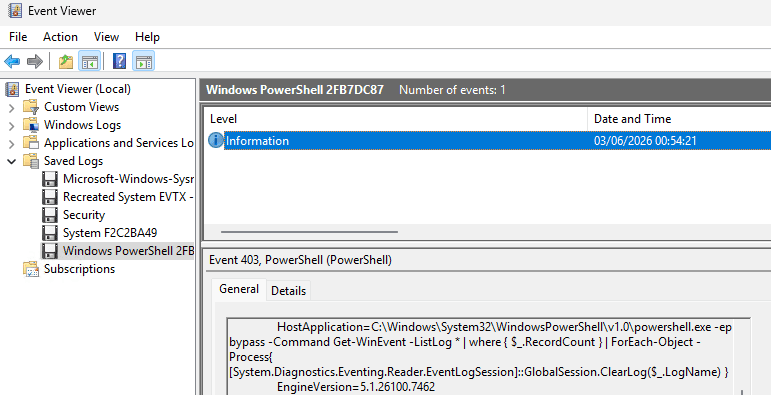
Figure 11: Log clearing entry of a cleared Windows PowerShell EVTX file
The event log, figure 11, shows one record, as expected, with the log clearing command.

Figure 12: EVTX Record information of the one and only allocated entry, showing the log clear activity on 2026-03-06 00:54:21.

Figure 13: Last event record in file slack space, showing a timestamp of 2026-03-05 09:59:23, which is earlier than the single allocated record.
In total, there were 44 event records in this Windows PowerShell EVTX file, of which only one (1) was allocated. Interestingly, every single log entry was the same PowerShell clearing command
Systempowershell.exe -ep bypass -Command Get-WinEvent -ListLog * | where { $_.RecordCount } | ForEach-Object -Process{[System.Diagnostics.Eventing.Reader.EventLogSession]::GlobalSession.ClearLog($_.LogName) }
This shows the threat actor clearing the log file multiple times. Whether or not the threat actor deliberately filled the log file slack space with data is not determinable.
Conclusion, Impact, and Next Steps
Event records are key pieces of intelligence for incident responders and forensic analysts. In many instances, forensic analysts are no stranger to recovering deleted data. However, cleared EVTX files pose a challenge, as deleted but still allocated entries are not recovered (or flagged) by standard forensic tools or processes, to our knowledge. Yet there are still many methods to recover these entries, if they exist. All that is required is to learn how EVTX files operate (aka how a “child” operates) and how check underneath the digital “bed”.
While we built a proof of concept (PoC) Python script to carve and rebuild old records from an allocated EVTX file, industry standard tools should, at minimum, alert on EVTX files with possible old data. As a solution, we recommend some level of recovery and notation that a recovered record is a partial record and to place the parsed info within normal forensic output.
References:
Research paper on EVTX file which covers the possibility of free space:
Andreas Schuster,
Introducing the Microsoft Vista event log file format,
Digital Investigation,
Volume 4, Supplement,
2007,
Pages 65-72,
ISSN 1742-2876,
https://doi.org/10.1016/j.diin.2007.06.015.
(https://www.sciencedirect.com/science/article/pii/S1742287607000424)
Offset Charts written for EVTX library (libevtx)
Specifically, the Chunk Header offset documentation can be found here: https://github.com/libyal/libevtx/blob/main/documentation/Windows%20XML%20Event%20Log%20(EVTX).asciidoc#31-chunk-header
X-Ways Templates for Quick Hex Review: https://github.com/digitalsleuth/xways-templates/tree/main
TZWorks tools of interest (paid tools): https://tzworks.com/prototype_page.php?proto_id=4 https://tzworks.com/prototype_page.php?proto_id=25
By Cole Pixley and Eric Draeger