

Summary
Arctic Wolf Labs has observed a recurring social engineering pattern in hundreds of cases where threat actors have used Microsoft Teams’ external chat creation feature for impersonation scams, or to deliver malicious files. A consistent pattern of attacker behavior has emerged across these incidents: the use of the same throwaway tenants, the same “IT Support (Internal)” display names, the same remote-access tools, and increasingly, the same payload domains.
In this report, we’ll explore our findings, examine how attackers weaponize the external access / federation feature in Teams to reach employees, reveal the infrastructure identified through Arctic Wolf’s telemetry, and discuss the defensive measures organizations can take to disrupt this attack chain.
Key Findings
- Arctic Wolf analyzed more than 400 incidents involving abuse of the Microsoft Teams external chat functionality for social engineering activity and initial access.
- Threat actors repeatedly used highly consistent IT-support impersonation tactics, including IT-themed display names, friendly-sounding first names, and “(Internal)” labels designed to undermine external-user warnings in Teams.
- We observed a measured infrastructure shift, from disposable .onmicrosoft[.]com tenants toward attacker-controlled domains, with .top domains accounting for roughly half of observed paid-domain cases.
- Arctic Wolf detects this activity at the ChatCreated stage, creating a window of opportunity to identify and disrupt attacks before a victim engages with the threat actor.
Context
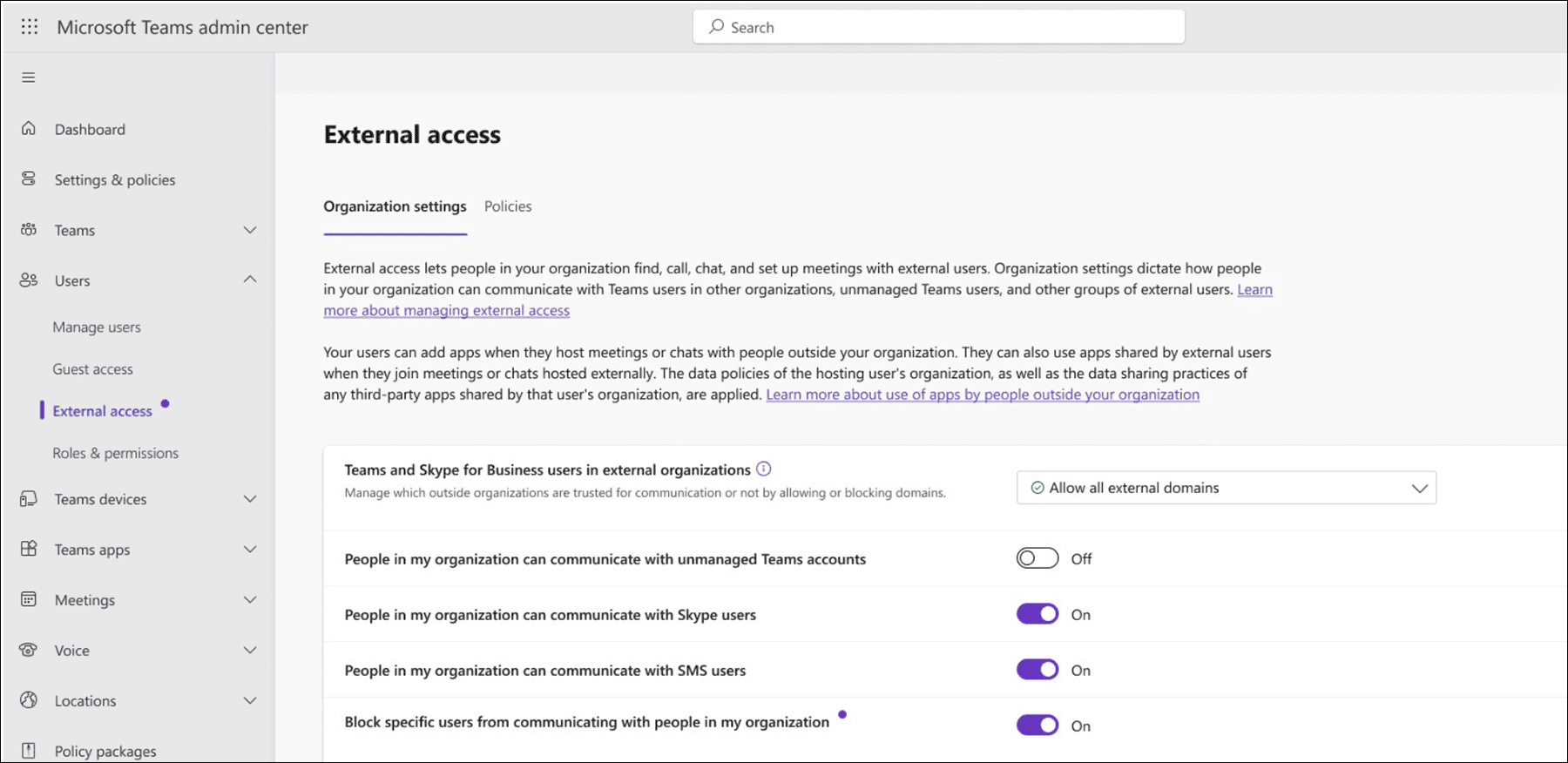
Microsoft Teams ships with external access (federation) turned on by default, meaning any Teams user in another Microsoft 365 tenant can find, chat with, and call an organization’s employees, provided both tenants allow external access. This is the feature attackers most frequently abuse. This activity does not exploit any known Teams vulnerability; it abuses a legitimate, default-on collaboration capability.
How Threat Actors Establish Teams Identities
Threat actors commonly establish external Teams identities through newly created or acquired Microsoft 365 tenants. Between 30 to 40 percent of the cases we analyzed involved default *.onmicrosoft[.]com tenant domains. This default domain requires no verification and can be provisioned within minutes, giving attackers a functioning Teams identity with minimal setup.
Arctic Wolf observed that, even when using this default domain, attackers engineer the tenant’s sender name to read as IT infrastructure. We have supplied a list of the default *.onmicrosoft[.]com tenant names observed in use across multiple customers in the Appendix at the end of this report [1].
Arctic Wolf assesses that threat actors typically select a support-, IT-, admin-, network-, or helpdesk-themed word as the tenant name, optionally suffixed with the number 365, or the words online, portal, or a random number, to obtain a free tenant name. In a smaller number of cases, Arctic Wolf observed threat actors using legitimate company names in the sender’s tenant name to increase their credibility.
How the Attack Unfolds
In a significant number of cases, customers reported that the malicious Teams contact was preceded or accompanied by “mail bombing”, the flooding of a victim’s inbox with hundreds of newsletter or subscription confirmations within minutes. The email storm is intended to manufacture urgency and bury legitimate emails such as security alerts, with the Teams “IT support” message arriving moments later to offer to resolve the very same problem the attacker just created.
This reflects an abuse of trust: employees are generally trained to treat email with suspicion, but a message delivered from inside their Teams instance bypasses that learned caution.
Beyond email masquerading, Arctic Wolf identified a range of consistent naming techniques used by threat actors across customer alerts. The attacker’s Teams display name is central to the deception. Arctic Wolf observed the following impersonation display names most frequently, meaning the pattern occurs across multiple cases: [2]
- Attackers append “(Internal)” to the display name so the recipient perceives the message as coming from an internal IT sender, even though Teams simultaneously labels the sender as External.
- Reoccurring usage of friendly-sounding names, such as “IT Service Desk – Liam , IT Support (Scott McGhee)”, or “IT Service Desk (Matthew)”. Here, adding a first name makes the Teams message appear to come from a real member of their organization’s Service Desk.
- In several cases, attackers used region-specific naming conventions tailored to the target’s locale: for example, “Supporte TI,” the French/Spanish variant of “IT Support.”
- We observed roughly 100+ emoji markers ( 🛡 shield, 🛠️/🔧 tools, ✅ check) used in attacker display names: e.g., “IT Support 🛡| Corporate IT Service 🛠 (Internal).” This may be evidence of the use of AI such as ChatGPT and AI-related automation to create content and identities in support of this campaign.
- Most recently, we observed the attacker/external Teams user adding the target organization’s domain or company name in their own display name to make the message appear more legitimate.
We also observed a recent shift toward paid top-level domains (TLDs) for tenant creation. Of the paid domains we identified in these types of scams over the past few months, approximately 50 percent of fake identities used the .top TLD, around 40 percent used a standard .com domain, and just over five percent used multi-level domains such as .com.pl, .com.vn, and .com.br.
This aligns with Sophos’s reporting on the STAC4749 / Chaos ransomware campaign, which found that attackers have moved away from onmicrosoft[.]com throwaway tenants and toward IT-themed .top domains for payload staging and command-and-control (C2), as the low cost of .top registrations allows for convincing “update/ security/support” hostnames. Arctic Wolf also observed repeated use of other common TLDs, including .com.br and .com.vn in activity reported during July and August.
In a subset of these custom domains, attackers deliberately configured DNS records to redirect web requests to the legitimate Microsoft or victim organization site to appear authentic.
Attack Chain for Teams Chat Creation
Attackers target organizations where external access is enabled. Chat creation itself is only the entry point. Arctic Wolf assesses that, once trust is established, the attacker’s immediate goal in most cases is to obtain hands-on-keyboard access through a legitimate remote monitoring and management (RMM) tool.
We also frequently observed attackers using vishing (a direct voice call to the victim from within Teams) to secure RMM installation. In cases where attackers target multiple victims simultaneously, typically via automation, the initial contact begins with a Teams chat message instead of a call. The most commonly observed RMM tools used in relation to this scam were Quick Assist (QuickAssist.exe / msra.exe), AnyDesk, ScreenConnect (ConnectWise), TeamViewer, Atera, Zoho Assist, NetSupport, and LogMeIn.
Of these, Quick Assist is the most frequently used. This may be because it is built into Windows, signed by Microsoft, requires no installation, and only requires the victim to read back a six-digit code. When attackers seek persistence beyond the initial call, they pivot to a commercial RMM tool (AnyDesk, Atera, ScreenConnect, or a second platform such as Level, installed via msiexec), which provides an independent control channel that survives remediation of the original implant.
Arctic Wolf identified a consistent attack chain across successful exploitation cases and correlated it with chains previously documented by security vendors such as Microsoft and Zscaler:
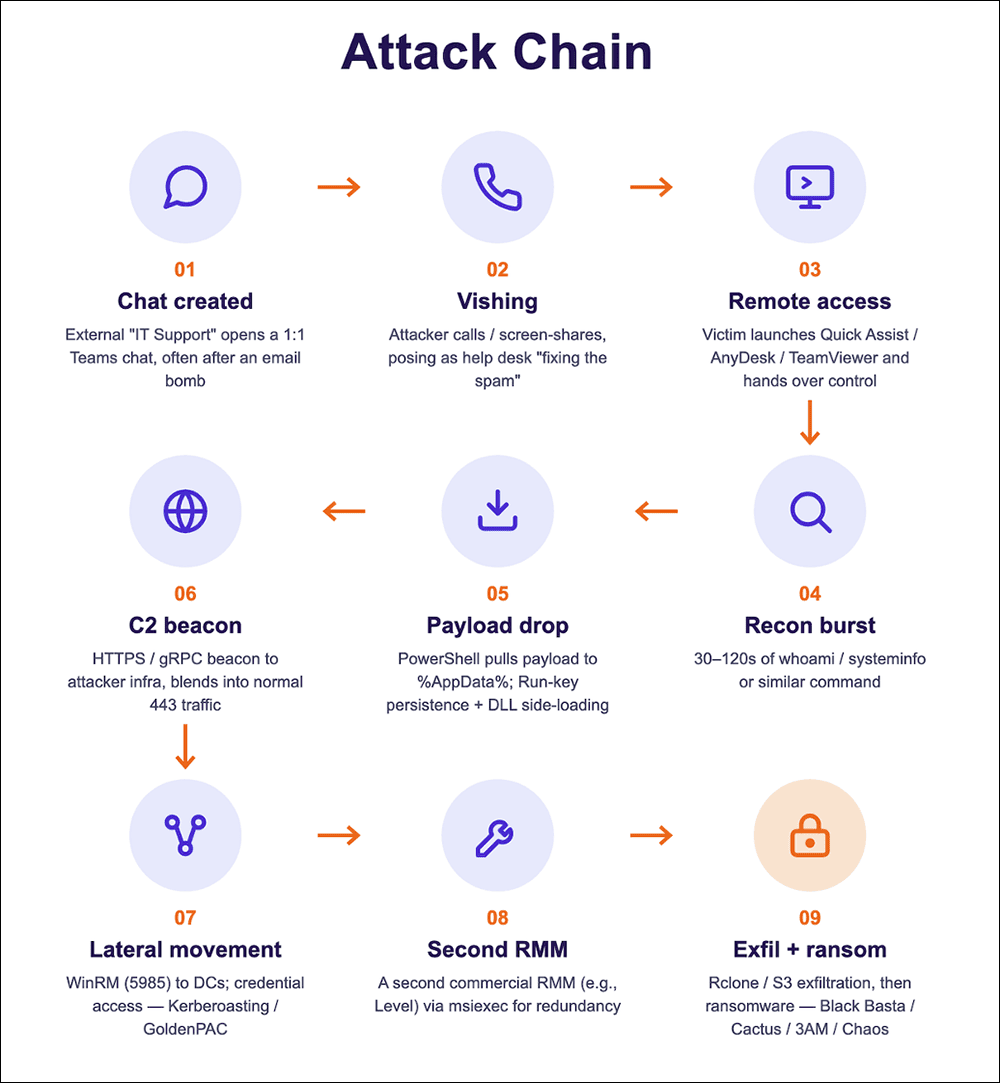
Attackers commonly target multiple users within short windows of time (approximately five minutes) to increase the likelihood of success, most likely performed through automation. Once a victim engages, the attack chain reported by customers shows threat actors reaching payload execution in under 15 minutes. Arctic Wolf observed similar compression in its own data: several cases recorded concurrent credential-access detections (Kerberoasting, GoldenPAC-related) firing alongside the initial Teams alert, indicating the endpoint was already compromised by the time the chat alert was triaged.
In a subset of cases, attackers leveraged Microsoft’s notes. Attackers generally avoid pasting a URL directly into Teams, which would trigger Safe Links / ZAP scanning, and instead navigate to the payload themselves during the remote session. Consequently, endpoint and identity telemetry are essential monitoring surfaces alongside message scanning.
How Teams Chat Abuse Works
Threat actors using external Teams chat as an initial-access vector is not new. The practice was first documented by Microsoft in the Black Basta (Storm-1811) campaign in mid-2024, which used the now-familiar chain of email bombing → external Teams “help desk” → Quick Assist → QakBot/DarkGate/Cobalt Strike → ransomware.
The technique was later observed in the Cactus campaign and in 3AM and Chaos. Earlier this year, Zscaler reported on the GoGRPC campaign, in which Teams vishing and Quick Assist were used to deploy the GoGRPC backdoor.
Example Attack Observed by Arctic Wolf
Arctic Wolf recently identified a potentially novel infection chain leveraging external Microsoft Teams chat messages, in which the threat actor posed as an IT helpdesk employee to initiate the attack. In the case we observed, the attacker instructed the user to run a PowerShell command and launch the downloaded file. The initial payload retrieval was performed via PowerShell, and both actions executed under the victim’s account with a parent process of explorer.exe, reminiscent of ClickFix, though not disguised as a CAPTCHA.
Next, the PowerShell command downloads an MSI from Azure Blob Storage, which bundles a PowerShell script and a ZIP archive (archive6.zip). Approximately 30 seconds after the MSI is launched by the user, the bundled PowerShell script (cleaner.ps1) is dropped into the users’ AppData folder (AppData\Local\PowershellCleaner\scripts) and executed. The script cleaner.ps1 contains a large array of hexadecimal characters, preceded by an IEX instruction to execute the joined and decoded array; the resulting plain code is a loader that reads a block of AES-encrypted data, decrypts it using hard-coded key/IV and computes its hash. If the hash matches a hard-coded value, the resulting PowerShell is executed via ScriptBlock.
Ultimately, this is an obfuscated decryption and execution stub to build and run an additional PowerShell payload. The purpose of this final payload is to extract the pythonw interpreter and implant (ss.py), both from the bundled archive6.zip. After sleeping for five seconds, the implant is executed via pythonw.exe.
The implant then starts another MSI transaction that issues LDAP queries to Active Directory for all computer and user objects (filtering for both Category and Class) using the System.DirectoryServices.DirectorySearcher PowerShell shortcut adsisearcher, formatting the attribute output as [sAMAccountName] – [description]. This information is then transmitted to C2 server endpoints that are randomly selected from a list of domains and URIs laid out in the implant’s code.
How Arctic Wolf Protects its Customers
From the newly created tenant, the attacker initiates a one-on-one chat, which avoids the visibility associated with group conversations. Microsoft records this first contact as a ChatCreated event, which Arctic Wolf assesses to be the primary detection opportunity for defenders. Our alerts most frequently fire exactly here, before the user has done anything.
Arctic Wolf combines multiple detection engines to identify suspicious external Teams chats. Drawing on observations from thousands of customer environments, Arctic Wolf maintains indicators of compromise (IOCs) associated with these campaigns, including impersonation-focused display names such as IT Helpdesk and Helpdesk Support as well as attacker-controlled tenant and domain patterns.
Arctic Wolf’s behavioral engine also monitors Microsoft tenants that initiate conversations with multiple Arctic Wolf customers. When activity from a tenant, account, or domain appears anomalous, particularly when combined with other signals such as email bombing or suspicious follow-on activity, Arctic Wolf flags it for investigation.
Arctic Wolf also tracks top-level domains that threat actors commonly use to create tenants, host payloads, or support command-and-control infrastructure.
Beyond monitoring the initial Teams-based social engineering lure, Arctic Wolf maintains detections for the remote monitoring and management (RMM) tools that attackers frequently push during these engagements. Arctic Wolf alerts on the execution of RMM tools that are not sanctioned or expected within a given environment, since the unauthorized installation of legitimate remote access software is a common technique used to establish persistence once a victim has been convinced to grant access.
Arctic Wolf also correlates behavior over time, flagging cases where an RMM tool installation is followed by reconnaissance commands, such as enumerating users, groups, or network configuration, and prioritizing these for investigation.
Conclusion
External Microsoft Teams chat has become an effective initial-access vector because it exploits trust rather than a software vulnerability.
Arctic Wolf has been able to monitor and protect our customers from these attacks with proactive defenses. Across the activity examined, attackers combined email bombing, convincing IT-support impersonation, newly created tenants and domains, and rapid social engineering to move victims from a seemingly routine chat to remote access, payload execution, and, in some cases, broader compromise.
The recurring patterns provide defenders with valuable opportunities to interrupt the attack chain. An unexpected chat from an external tenant, particularly one that follows an inbox flood or uses an IT-themed display name, should be treated as suspicious. Correlating ChatCreated events with endpoint, identity, email, domain, and remote-access telemetry can reveal the progression even when the initial interaction appears benign.
Defensive Countermeasures for Organizations
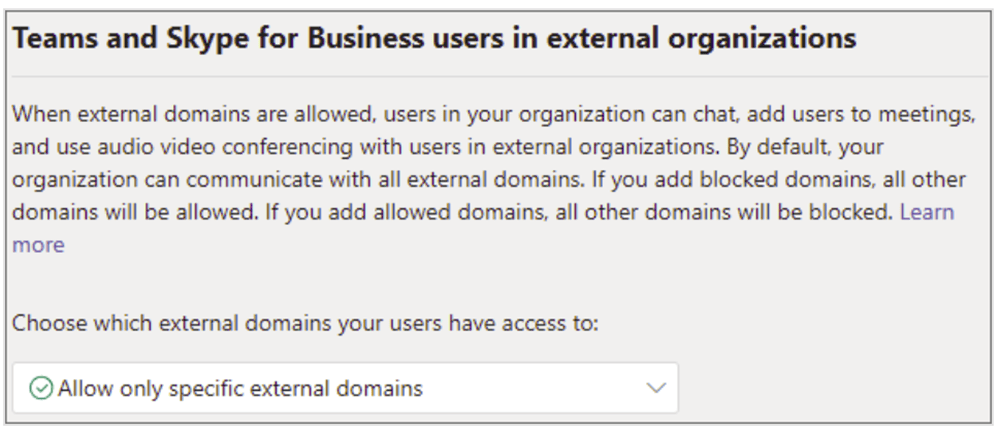
Most organizations have no legitimate need for open, any-tenant external chat. Per Microsoft’s guidance in Manage external meetings and chat with people and organizations using Microsoft identities, move from “allow all” to an allow-list of trusted organizations. Organizations can take the following proactive steps:
- In Teams admin center → Users → External access, select “Allow only specific external domains” and add only the partner domains the organization actively collaborates with. Once an allow-list is configured, all other domains are blocked by default.
- Block chat with unmanaged / Teams-consumer accounts, and disable the option that lets unmanaged users start conversations with your users.
- Block federation with trial-only tenants, as attackers commonly prefer free or trial tenants for their minimal setup requirements:
Set-CsTenantFederationConfiguration -ExternalAccessWithTrialTenants "Blocked"
- Enable “Allow my security team to manage blocked domains” so the security team can push blocks (e.g., the .top indicators listed in this report) through the Microsoft Defender Tenant Allow/Block List → Teams domains tab.
- Harden the remote-access path: block or restrict Quick Assist to authorized IT roles (or remove it where unused), and block or uninstall unsanctioned RMM tools (AnyDesk, TeamViewer, ScreenConnect, Atera, Level, Splashtop) via Defender for Endpoint or application control. Alert on any RMM tool not deployed through the Arctic Wolf agent.
Because this attack vector relies on social engineering rather than technical exploitation, people and process controls are critical to closing the gap:
- Out-of-band verification for all remote-access requests. Mandate a callback to the user’s registered number or an approval flow in a separate trusted app. An impersonator controlling the Teams channel can’t complete a verification that lives outside it.
- Tell staff exactly how real IT reaches out (which channels, which domains, which named contacts), and that unsolicited external “IT support” is inherently suspicious (especially if it appears right after an inbox spam flood).
- Train users to read the External tag and the real sender domain, and to never dismiss the Accept/Block, Safe Links, or first-contact warnings. Provide side-by-side examples of the organization’s real help desk communications versus an impersonator’s.
- Conduct targeted training for personnel regarding the specific social engineering tactics used in this campaign. For those without the time to devote to creating security training resources from scratch, the Arctic Wolf Aurora® Managed Security Awareness and Training solution delivers easily digestible security lessons for employees, including regular phishing simulations and a “Report Phish” button.
Microsoft is also clearly taking this threat seriously too. They’ve now built end-user reporting for security directly into Teams, letting employees report a suspicious message or an external user with a couple of clicks.
MITRE ATT&CK® Mapping
| Tactic | Technique (ID) | Observed |
|---|---|---|
| Resource Development | Acquire Infrastructure: Domains (T1583.001) | Cheap disposable .top domains dominate (getitconnect[.]top, get-help-systems[.]top, helpdesk-sys[.]top, help-desk-get[.]top, fix-it[.]top), plus lure domains on .icu, .online, .report, .zip. |
| Resource Development | Establish Accounts: Cloud Accounts (T1585.003) | Throwaway *.onmicrosoft[.]com tenants with IT-themed names (helpdeskteam365, itcoreportal, supportedge33, networkadmin916). |
| Resource Development | Establish Accounts: Email Accounts (T1585.002) | Attacker-created sender mailboxes used to initiate contact. |
| Initial Access | Phishing: Spearphishing via Service (T1566.003) | External Microsoft Teams 1:1 chat from an unknown/external tenant (ChatCreated). |
| Initial Access | Phishing: Spearphishing Voice / Vishing (T1566.004) | Voice/phone social engineering accompanying the Teams contact (help desk callback pretext). |
| Initial Access | Phishing (T1566) — email-bombing (T1667) precursor | Mail-bomb / spam flood immediately preceding the “help desk” outreach to manufacture urgency. |
| Initial Access | Trusted Relationship (T1199) | Abuse of default-on Teams external access / cross-tenant federation to reach internal users. |
| Initial Access | Impersonation (T1656) | Sender display names impersonating internal IT (“Help Desk”, “IT Support”, “IT-Representative”, “Help Desk Manager”). |
| Execution | User Execution: Malicious File (T1204.002) | .msi / .exe staging bundles or scripts delivered via Teams chat files; hands-on execution confirmed only in the few events where the user engaged. |
| Execution | Command and Scripting Interpreter: PowerShell (T1059.001) | PowerShell payload download/staging described as the expected post-access step |
| Defense Evasion | Masquerading (T1036) | Lure files/domains styled as legitimate IT/support assets. |
| Command and Control | Remote Access Software (T1219) | Quick Assist, AnyDesk, TeamViewer, ScreenConnect/ConnectWise remote-access tooling observed across these cases |
| Command and Control | Ingress Tool Transfer (T1105) | Download/staging of follow-on tools once remote access is granted. |
Appendix [1]
NOTE: Arctic Wolf assesses that the following domains seen in relation to these attacks are all fake and are not real Microsoft domains.
| Attacker Tenant (Default *.onmicrosoft[.]com tenant names observed by Arctic Wolf across multiple intrusions) |
|---|
| supportedge33[.]onmicrosoft[.]com / supportedge39[.]onmicrosoft[.]com |
| helpdeskteam365[.]onmicrosoft[.]com |
| itendpoint365[.]onmicrosoft[.]com |
| itcoreportal[.]onmicrosoft[.]com |
| networkadmin797[.]onmicrosoft[.]com / networkadmin916[.]onmicrosoft[.]com |
| itadmin922[.]onmicrosoft[.]com |
| supportagentonline[.]onmicrosoft[.]com |
| threatpro[.]onmicrosoft[.]com |
| ithelpplus42[.]onmicrosoft[.]com |
| corporateitservicellc[.]onmicrosoft[.]com |
| techsupport2337[.]onmicrosoft[.]com |
Appendix [2]
| Display Name/ Pattern Used by Threat Actors |
|---|
| Help Desk |
| IT Support |
| HelpDesk Manager |
| IT Service Desk – Liam / IT Service Desk (Liam) |
| IT Service Desk – Matt / IT Service Desk – Scott |
| IT Support – Christopher Thomas |
| HelpDesk Supervisor |
| Enterprise IT & Security (Internal) |
| IT Tech Support Internal |
| Business IT Solutions & Support (Internal) |
| Maintenance Service |
| IT-Representative |
| IT/Help Desk |
| IT/”update”-Themed .top Payload and C2 Infrastructure |
|---|
| update-software[.]top |
| infoupdate-it[.]top |
| soft-program[.]top |
| getsysmonitor[.]top |
| programupdate-assis[.]top |
| expertassist[.]top |
| sec-check-it[.]top |
| upd-check-soft[.]top |
| assis-programupdate[.]top |
| get-info-check[.]top |
| updsysseq[.]top |
| techrelay[.]top |
| verifsec-update[.]top |
| sys-update-check[.]top |
| get-help[.]top |
| it-assistant[.]top |
| ms-system-check[.]top |
| scan-updseq[.]top |
| it-seccontrol[.]top |
| verifcontrol-update[.]top |
| get-upd-sys[.]top |
| get-sys-info[.]top |
| getsystembridge[.]top |
| data-sys-seq[.]top |
| soft-network[.]top |
| Help-Desk Lookalike .com Domains (Classic Impersonation Infra) |
|---|
| helpdesk-support-us-ny[.]com |
| helpdesk-support-office-3[.]com |
| helpdesk-support-office-4[.]com |
| helpdesk-support-us3[.]com |
| helpdesk-call[.]com |
| helpdesk-s1x[.]com |
| itdeskassist[.]com |
| Notable Payload/Credential-Phish Domains Seen Repeatedly |
|---|
| kilan[.]com[.]pl |
| saludcentro[.]gov[.]co |
| ggc[.]com[.]ph |
| scapini[.]com[.]br |
References:
- Microsoft: Cross-tenant helpdesk impersonation to data exfiltration
- Microsoft Teams admin: Manage external meetings and chat (trusted organizations)
- Zscaler ThreatLabz: Helpdesk Hijackers: Teams Vishing, Quick Assist, and GoGRPC
- Sophos: Chaos in Teams vishing (STAC4749)
- ReliaQuest: Former Black Basta affiliates automating executive targeting
- BleepingComputer: Teams tactics connect Black Basta and Cactus ransomware
- UNC6692: How UNC6692 Employed Social Engineering to Deploy a Custom Malware Suite | Google Cloud Blog
Additional Arctic Wolf Resources:
- Read related blog: Black Basta Ransomware Group Affiliates Leveraging Windows Quick Assist for Initial Access
- Subscribe to Arctic Wolf’s Threat Intelligence newsletter: ThreatPulse Community Edition
- Arctic Wolf Tech Den
- Arctic Wolf Blog
Legal disclaimer: Attribution reflects Arctic Wolf Labs’ assessment as of the report period and may evolve with new evidence. References to threat actor identity, nexus, and intent are analytical judgments, not statements of legal fact. This alert is provided for informational purposes only and does not constitute a guarantee of detection or prevention. Defensive effectiveness varies by environment, configuration, and available telemetry.