
Executive Summary
On 19 August 2025, the Arctic Wolf® Cybersecurity Operations Center (cSOC) uncovered and remediated a sophisticated delivery chain: a threat actor leveraged GitHub’s repository structure together with paid placements on Google Ads to funnel users toward a malicious download hosted on a lookalike domain. By embedding a commit‑specific link in the advertisement, the attackers made the download appear to originate from an official source, effectively sidestepping typical user scrutiny
The delivered malware is unique: the bloated 128 MB Microsoft Software Installer (MSI) evades most existing security sandboxes, while a Graphics Processing Unit (GPU)-gated decryption routine keeps the payload encrypted on systems without a real GPU. We have called this new attack technique “GPUGate”.
Key Takeaways
- Trusted‑source Illusion: Even when a link seems to point to a reputable platform such as GitHub, the underlying URL can be manipulated to resolve to a counterfeit site.
- Ad‑driven Redirection: Paid search and display ads can be weaponized by bad actors to distribute malicious payloads at scale, misleading users who rely on search engines for discovery.
- Privilege Escalation: Once the malicious payload is executed by the user, it gains administrative rights, enabling further lateral movement and persistence.
- Malware Uniqueness:
- The initial installer is a 128 MB MSI file that mimics the legitimate GitHub Desktop installer but contains over 100 dummy executables to inflate size and evade sandbox limits.
- The installer employs a GPU‑gated decryption routine: an OpenCL™ kernel derives the AES key only on machines with a real GPU, whose device name is at least ten characters long, causing the payload to remain encrypted in headless analysis environments. (A headless environment is where the front-end or user interface of an application (the “head”) has been decoupled from the back-end services, allowing each to be developed and operated separately.)
- The GPU-based decryption mechanism suggests the attackers are targeting systems with specific hardware configurations, potentially focusing on users involved in development, gaming, or cryptocurrency mining activities.
- Campaign Goals: We believe the goal of this campaign was to gain initial access to organizations for the purposes of malicious activity such as credential theft, infostealing and ransomware deployment, by misleading IT workers (who often have higher level of network access) into downloading malware while attempting to install GitHub Desktop.
- Geography and Industries Targeted: The campaign we observed targeted users in Western Europe, in the Information Technology industry.
- Attribution: The threat actors behind this campaign have native Russian language proficiency, as demonstrated by PowerShell script comments written in Russian.
Attack Chain
Initial Infection Vector
Step 1: The Poisoned Search Results.
The first step of this attack chain is malvertising (malicious advertising). In this case, the attackers created a Google Ad that appears at the very top of real Google search results – in the coveted “sponsored” position that users often trust implicitly.
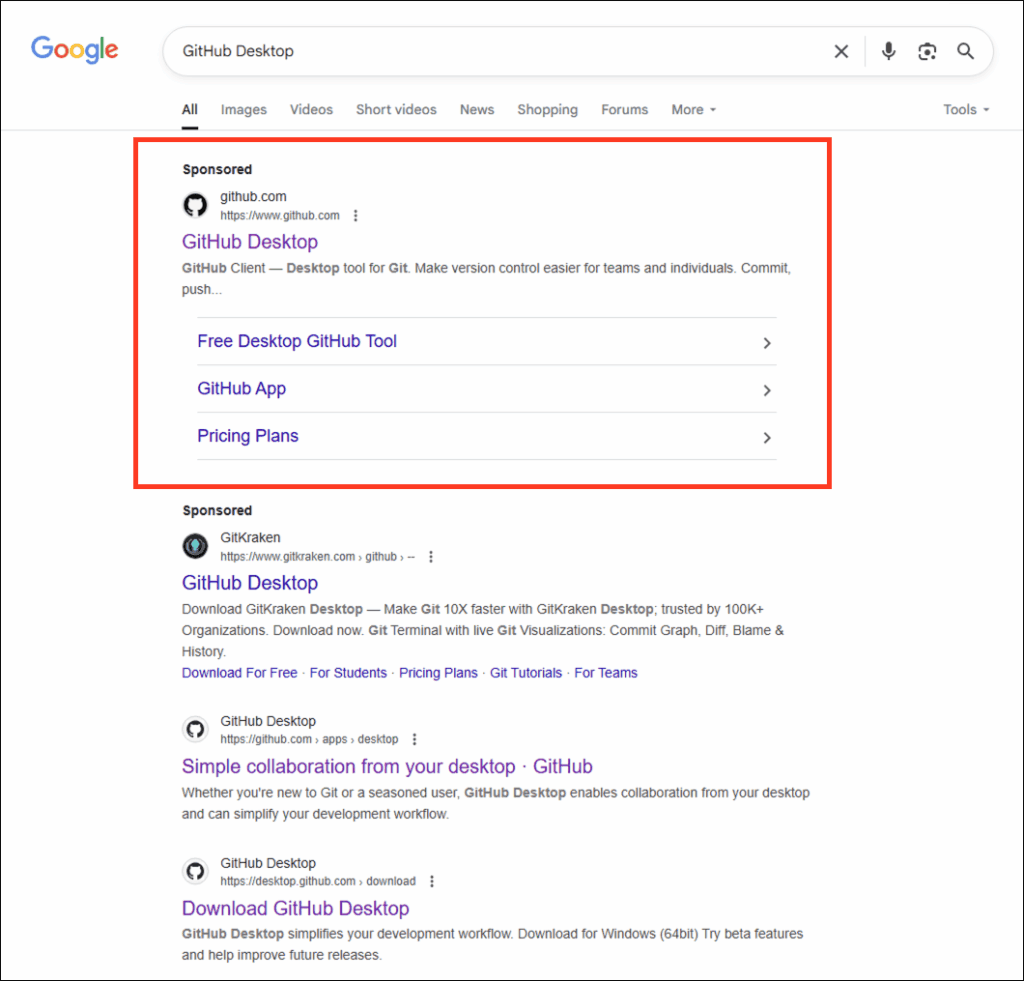
Figure 1: Malicious Google Ad created by threat actors shown in the “Sponsored” ad position, at the top of real Google search results.
The psychological manipulation of victims here is key to the success of the campaign. When someone searches the internet for “GitHub Desktop,” they expect the first result to be legitimate, especially when it’s marked as “Sponsored” and shows the official GitHub branding.
Step 2: The Trust Bridge.
The attackers aren’t hosting a fake GitHub site—they’re abusing GitHub’s own infrastructure to manipulate and trick users. In this case, the threat actor created a specific commit (a48188b0d5bdc3e8728cb37619cc51f7392b086f) in a legitimate GitHub repository and then modified the README file to include malicious download links.
A GitHub “commit” is a snapshot of the changes made to a Git repository at a specific point in time; each commit is assigned a unique ID in the form of a SHA or hash that identifies the state of the files and directories within the repository, along with metadata about the change.
GitHub’s platform lets anyone view any commit in a repository’s history – a feature that is normally very useful for developers. But it can be abused. By embedding the commit hash into the page’s URL itself, an attacker can display a page that looks identical to the original repository, but contains their own changes – in this case, altered download links in the README file.
Because the commit page still shows real, legitimate data, such as the repository’s name and URL, fork/star count, contributors, and other such metadata, it appears legitimate and trustworthy to the user. The only indication that the page is a single commit view is a small banner at the top stating that the visitor is viewing a specific commit, rather than the repository’s default branch.

Figure 2: Yellow bar warning on GitHub letting the user know the page they are viewing is a single commit view. In other words, it may not be official GitHub content.
However, this warning is easily bypassed. By appending an anchor to the link, the advertisement sends the visitor straight to the malicious download section at the bottom of the single malicious commit page, skipping the “yellow bar” warning entirely.
Step 3: The Invisible Redirect.
The download links on this compromised page don’t point to GitHub’s official releases. Instead, they redirect the user to gitpage[.]app, a malicious domain controlled by the threat actor which serves the malware.
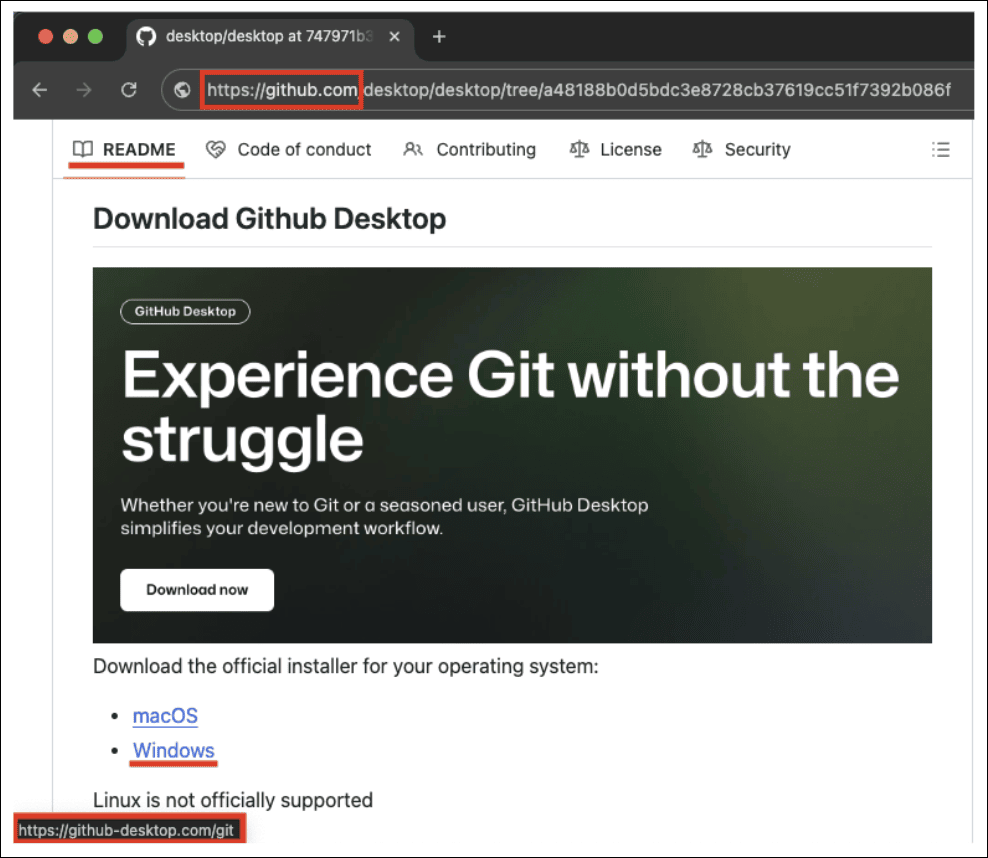
Figure 3: Browser beware: Always hover your cursor over the blue underlined hyperlink and check the address bar in the lower left-hand corner, to make sure the destination is what you’re expecting.
Second Stage – GitHubDesktopSetup-x64.exe Execution
The initial executable, GitHubDesktopSetup-x64.exe, immediately begins a careful orchestration of a mix of legitimate and malicious activities.
| Attribute | Value |
| File Type | MSI (Windows Installer) |
| Size | 133,879,374 bytes (≈ 127.7 MB) |
| MD5 | 935026f24588d35661d53f8e34993b54 |
| SHA‑1 | 72bd272087f9727da6f5436e5255cc376d29598 |
| SHA‑256 | ad07ffab86a42b4befaf7858318480a556a2e7c272604c3f1dcae0782339482e |
| Compile Date (Embedded .NET assembly) | 2024‑12‑10 21:00:44 |
| Internal Name | UpdaterClient.dll |
The file is written using the .NET Framework, which is a proprietary software framework developed by Microsoft for building and running applications on Windows. It has the following debug path:
| D:\a_work\1\s\artifacts\obj\coreclr\windows.x64.Release\Corehost.Static\singlefilehost.pdb |
The attackers have created what we might call a “nested doll” approach to malware delivery. The large file size is designed to better match the legitimate GitHub Desktop installer (which is 160 MB) and prevent execution on many online sandboxes, since uploaded file sizes are often limited.
The malware developer has also modified the header to prevent file extraction by many popular tools. The MSI file contains 171 executable files, with at least one being malicious, while over 100 are included as “garbage files” to complicate analysis by antivirus (AV) products and analysts. These files were added to the installer for noise, and to inflate the overall file size. This is known as a chaff deployment.
Functions found in this file also appear in some samples of a ransomware family. For example, the function “?JIT_CheckObj@@YAPEAVObject@@PEAV1@@Z” located at address 14015bed0 implements:
| class Object* JIT_CheckObj(class Object* obj) 14015beda if (obj != 0 && MethodTable::ValidateWithPossibleAV(this: obj->m_pMethTab) == 0) 14015bf03 __FreeBuildAssertFail(szFile: “D:\a\_work\1\s\src\coreclr\vm\jithelpers.cpp”, 14015bf03 iLine: 0xe84, szExpr: “!”Bad Method Table””) 14015bf03 noreturn 14015bf03 14015beef return obj |
Meanwhile, the debug path “D:\a_work\1\s\src\coreclr\vm\jithelpers.cpp” also appears in ransomware sample fc160cb764c8458bb97f587da4023ac790244ecf2f7b7544d611d4b245be451c and several others. An embedded malicious module is located at address #96d00 (overlay:800) within the main installation file.
This embedded module has a file size of 62,930,432 bytes (60.0 MB), with an MD5 of a34392f357ae602e3f1d0822fe77f8d1, a SHA-1 of 75cbd92b8a631b7900f27cf8cd58a20d548aff6c, and a SHA-256 of 3746217c25d96bb7efe790fa78a73c6a61d4a99a8e51ae4c613efbb5be18c7b4. This module is written in .NET, with the debugging path C:\OpenCl\UpdaterClient\obj\Release\net9.0\win-x64\UpdaterClient.pdb, a compile date of 2073-11-16 23:29:15, and an internal name of UpdaterClient.dll.
How GPUGate Avoids Analysis
The threat actor behind this campaign appears to understand very well how malware analysis works. Traditionally, financially motivated malware coders (such as ransomware developers) have tried to make their code as compatible as possible with all available systems/ OSes to maximize infection rates and their subsequent payouts. This malware takes the opposite approach – it deliberately excludes systems that don’t meet very specific hardware requirements.
There is a good reason for this. Systems without proper GPU drivers are likely to be virtual machines (VMs), sandboxes, or older analysis environments that security researchers commonly use. The executable we analyzed in this campaign uses GPU functions to generate an encryption key for decrypting the payload, and it checks the GPU device name as it does this. If the device name is less than 10 characters, the program terminates. If GPU functions are not available, the program also terminates. This mechanism helps the attackers to avoid running their malware on a system controlled and monitored by defenders.
The device name length check itself is an interesting anti-analysis technique. Virtual machines and analysis environments often have simplified or generic GPU device names that are shorter than real hardware names. A legitimate gaming GPU might have a name like “NVIDIA GeForce RTX 4090” (25 characters), while a virtual machine might be named something like “VMware SVGA” (10 characters exactly). By requiring device names longer than 10 characters, the malware filters out many analysis environments, avoiding researchers while still running on real user systems.
Decryption Mechanism
The GPUGate malware implements a two-stage decryption mechanism involving OpenCL GPU processing. OpenCL (Open Computing Language) is an open, royalty-free standard for cross-platform, parallel programming. It allows developers to write programs that can run on various types of processors, including GPUs, Central Processing Units (CPUs), Digital Signal Processors (DSPs), Field-Programmable Gate Arrays (FPGAs), and many other hardware accelerators.
The Resources class we analyzed contains the encrypted payload (5648 bytes) and the encrypted OpenCL kernel (709 bytes). The GpuKeyGenerator class uses OpenCL to generate the decryption key via GPU computation, while the XCtx class provides a custom AssemblyLoadContext for loading the decrypted .NET assembly.
The decryption process has two stages:
The first stage is decrypted using XOR with key 0x5A. It launches code that generates a key for the second stage decryption of the payload.
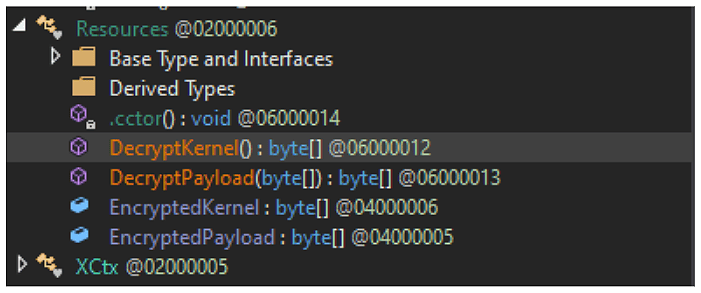
Figure 4: Decryption Implementation
The encrypted kernel, when decrypted, reveals the following code for cryptographic key AES verification and decryption functions:
kernel void generate_key(global uchar* output, __global const char* device_name)
{
    int id = get_global_id(0);
    int suspicious_flag = 0;
    // Check device name length
    int length = 0;
    for (int i = 0; i < 32; i++) {
        if (device_name[i] == '\0') break;
        length++;
    }
    if (length < 10)
        suspicious_flag = 1;
    uchar good_key[16] = { 0x12, 0x34, 0x56, 0x78, 0x9A, 0xBC, 0xDE, 0xF0, 0x11, 0x22, 0x33, 0x44, 0x55, 0x66, 0x77, 0x88 };
    uchar fake_key[16] = { 0xAA, 0xAA, 0xAA, 0xAA, 0xAA, 0xAA, 0xAA, 0xAA, 0xAA, 0xAA, 0xAA, 0xAA };
    if (id < 16)
        output[id] = suspicious_flag ? fake_key[id] : good_key[id];
}
Conditional Key Generation
The kernel code checks device name length and implements conditional key generation. If the GPU device name length is less than 10 characters, it uses a fake key (0xAAAAAAAAAAAAAAAAAAAAAAAAAAAAA), but if the GPU device name length is 10 characters or more, it uses the good key (0x123456789ABCDEF01122334455667788).
The kernel function generate_key takes global char* output and global const char* device_name as parameters. It calculates the device name length and sets a suspicious flag if the length is less than 10 characters. The function defines a good_key array with values 0x12, 0x34, 0x56, 0x78, 0x9A, 0xBC, 0xDE, 0xF0, 0x11, 0x22, 0x33, 0x44, 0x55, 0x66, 0x77, 0x88 and a fake_key array filled with 0xAA values. The output receives either the fake key or good key based on whether the suspicious flag is set.
This mechanism only works on real, non-virtual systems with proper GPU drivers, and prevents static analysis attempts. The payload uses AES-CBC encryption with zero IV, where the key is generated by GPU computation. The EncryptedPayload is located at RVA 0x03C03C40 spanning 5648 bytes, while the EncryptedKernel is at RVA 0x03C05250 spanning 709 bytes.
Full Execution Flow

Figure 5: GPUGate execution flow (Click to enlarge).
PowerShell Script Analysis
- Copies itself to the user’s %APPDATA% directory for persistence.
- Ensures it runs with administrator privileges by prompting for UAC elevation if needed.
- Runs itself in a detached (background) process to avoid user detection.
- Creates a marker file to prevent repeated execution (adm_marker.tmp).
- Adds exclusions to Windows Defender (aka Microsoft Defender) for %APPDATA%, %LOCALAPPDATA%, and %ProgramData% to avoid detection.
- Creates a scheduled task named WinSvcUpd to run itself at user logon with highest privileges.
- Downloads a ZIP file from a remote URL (hxxps://<delivery-c2>/zip[.]php) to the temp directory.
- Extracts the ZIP file to a randomly named temp folder.
- Executes any .exe files found in the extracted folder.

Figure 6: “adm_marker.tmp” creates a marker file to prevent repeated execution. Russian text below translates to, “If not admin, request UAC once and exit.”
The Russian comment, “Если не админ, запрашиваем один раз UAC и выходим” translates to, “If not admin, request UAC once and exit“, which reveals the script’s logic flow. This approach is manipulative because it presents users with a seemingly legitimate administrative request. When users see a UAC prompt after installing what they believe is legitimate software, they’re predisposed to approve it.
The “once and exit” strategy is particularly important, because it avoids the suspicious behavior of repeatedly requesting elevated privileges. The script recognizes that persistence through repeated UAC prompts would likely alert users that something unusual is occurring on their device.
The creation of an adm_marker.tmp prevents the script from repeatedly executing its initialization routines, which serves the purpose of reducing system resources being consumed, so (once again) the intended victim won’t notice anything malicious is happening.
ZIP Archive and DLL-Sideloading
As the final step, the PowerShell script downloads a ZIP archive and extracts it into the TEMP folder. Once unpacked, it executes the included .exe file. Although the executable itself is legitimate, it loads a malicious DLL placed alongside it that enables DLL sideloading, allowing the threat actors to keep a low profile.
What Exactly Can GPUGate Do?
A detailed analysis of the MITRE ATT&CK Techniques used in the GPUGate campaign are shown in full at the end of this blog, but we wanted to briefly highlight some of the most notable actions that may take place within the infected system, including the following:
Stealthy Execution, Persistence and Privilege Escalation:
- PowerShell is launched, with specific parameters designed to bypass execution policies and hide windows from user visibility.
- Persistent execution is established through scheduled task that survives system reboots and executes with administrative privileges across user sessions.
- Scheduled task is configured with the highest privilege level, to ensure persistent elevated access across system sessions and user contexts.
Defense Evasion
- The systematic addition of Windows Defender (aka Microsoft Defender) exclusions for malware storage locations prevent scanning of malicious components.
- Scheduled task uses deceptive naming (“WinSvcUpd”) designed to resemble legitimate Windows service update tasks, blending with normal system administration activities.
- PowerShell script restarts execution in detached process to break normal parent-child process relationships and complicate forensic analysis.
Command-and-Control
- The modular payload download system retrieves ZIP archives containing secondary malware components from remote infrastructure, based on system characteristics and operational requirements.
- Multiple redundant command-and-control domains and IP addresses across different hosting providers ensure operational continuity, despite individual infrastructure takedowns.
- Comprehensive system access and persistence mechanisms enable harvesting of stored credentials from web browsers and other local password storage mechanisms.
Discovery, Credential Access and Collection
- PowerShell script searches for and creates specific directory structures for persistent storage and execution, demonstrating file system reconnaissance capabilities.
- Persistent file system access enables discovery and theft of credentials stored in configuration files, scripts, and other plaintext storage locations.
- Malware persistence and administrative access enables collection of sensitive data from local file systems, including documents, configuration files, and application data.
- Potential clipboard monitoring capabilities are enabled through persistent system access, allowing collection of sensitive information copied by users, including credentials and financial data.
Exfiltration and Impact
- Automated data collection and transmission capabilities through persistent malware execution enable systematic exfiltration without manual intervention.
- There is potential ransomware deployment capability through the modular payload system, with code similarities to known ransomware samples, suggesting destructive capability development.
- Administrative privileges enable termination of security services and other protective mechanisms, potentially preparing systems for destructive actions.
- The potential capability to delete backup files and system recovery options through administrative access prevents recovery from destructive actions.
macOS Malware Deployment: AMOS Stealer
While researching this campaign and its network infrastructure, we noted the attacker-controlled site hxxps://gitpage[.]app/git/mac serving either the X64 or ARM version of AMOS Stealer, depending on the type of macOS processor used by the compromised device. Also known as Atomic Stealer, this is an info-stealer that was discovered in April 2023. Its developers sell it as malware-as-a-service (MaaS) on underground forums and on Telegram.
AMOS Stealer is capable of stealing keychain passwords, VPN profiles, notes and documents, browser data such as passwords and cookies, cryptocurrency data, and instant messenger (IM) data.
Victimology
This campaign exclusively targeted entities within Western Europe. The malvertising and geofencing used are customized to specifically target EU countries. The industries we observed directly targeted included workers in the Information Technologies sector. The campaign’s strategic use of developer-centric keywords and platforms suggests a deliberate focus on technical professionals.
The campaign leveraged Google Ads under the topic label “Computers and Consumer Electronics” to increase legitimacy and visibility to its target audience. This strategic categorization aligns with the interests of developers and IT professionals, making the malicious ads more likely to appear in relevant search results and attract clicks from users seeking GitHub-related tools.
By exploiting a trusted advertising platform and a topical label that resonates with the target audience, threat actors enhance the campaign’s effectiveness and reach.
Target Profile:
- Geographic Focus: European Union (EU) member countries
- Industry Sector: Technology and Software Development
Conclusions
This activity demonstrates that the novel and scalable malware evasion technique “GPUGate” has the potential to impact any organization. By exploiting GitHub’s commit structure and leveraging Google Ads, threat actors can convincingly mimic legitimate software repositories and redirect users to malicious payloads—bypassing both user scrutiny and endpoint defenses.
The GPU-gated evasions and decryption mechanism fundamentally challenges traditional malware analysis methodologies, especially used by traditional sandboxes. By requiring specific hardware configurations for payload decryption, GPUGate renders standard sandbox environments ineffective and forces analysts to deploy specialized infrastructure for investigation. This shift may inspire broader adoption of hardware-dependent evasion techniques across the threat landscape.
The technical evidence uncovered by Arctic Wolf researchers points to this campaign being conducted by a threat actor with native Russian language proficiency, as demonstrated by the PowerShell script comments written in Russian. The campaign’s relatively elaborate methods for defeating sandboxing suggests that this threat actor has deep anti-analysis knowledge.
The attack was documented in operational environments during August 2025, demonstrating sustained operational capability over an eight-month period between December 2024 and present. The malware compilation timestamp of December 10, 2024, combined with active command-and-control (C2) infrastructure and recent domain registrations, indicates an ongoing campaign with active development cycles.
Based on the malicious activity we’ve observed so far, the targets are primarily workers in the IT sector, which accounts for their interest in downloading GitHub Desktop. These individuals often serve as gatekeepers to highly sensitive codebases, deployment pipelines, and infrastructure credentials.
The exclusive focus on Western European IT professionals represents a calculated risk-reward optimization. By targeting individuals with elevated privileges and technical knowledge, the actors maximize potential access, while accepting reduced infection volumes. Successful compromise could enable supply chain attacks, credential theft, codebase manipulation, and lateral movement within enterprise networks.
The development of a malicious, targeted delivery chain of this complexity represents a substantial investment of time and resources for the threat actor. This campaign is still active at the time of writing, so it is likely this malicious activity will continue and attempt to claim more victims as the year progresses.
How Arctic Wolf Protects Its Customers
Arctic Wolf is committed to ending cyber risk, and when active campaigns are identified, we move quickly to protect our customers.
Arctic Wolf Labs has leveraged threat intelligence around “GPUGate” activity to implement new detections in the Arctic Wolf® Aurora™ Platform to protect customers. As we discover new information, we will enhance our detections to account for additional IOCs and techniques leveraged by the threat group behind this malicious activity.
Recommendations
The techniques utilized in the GPUGate campaign ensure that the malware runs only on real and carefully selected machines which match the malicious operator’s criteria. Such a selective and careful approach guarantees that only the most “interesting” victims are infected, while security researchers and even many cybersecurity products may initially fail in their analysis. This means that even if multiple users from the same organization download and run the same malicious file, it will execute differently, exiting on one device that fails to meet its standards, while deploying the next-stage implant on another.
This is why intrusion prevention and detection systems have their place among firewalls and sandboxes, to prevent attackers from exploiting security gaps. Endpoint Detection and Response (EDR) platforms can uncover hidden red flags before it’s too late, so consider implementing enterprise security solutions such as Arctic Wolf® Aurora™ Endpoint Defense.
To defeat tactics used in this campaign for initial access, make sure you always download software directly from the official site. Since this malware abuses a legitimate repo, make sure that not only the URL is correct, but also check you are at the legitimate branch, and not a custom one created by someone with malicious intent. Avoid clicking advertisements or sponsored links on third party sites or search engines, which can be spoofed or otherwise manipulated by threat actors, even those that are at the top of Google search results.
For defense in depth, you should disable or harden unnecessary PowerShell executions where possible. Enable process creation logging with command line arguments. Monitor for unusual PowerShell execution patterns and scheduled tasks creation. Regularly review exclusions set on your endpoint product, and alert on bulk or multiple additions of exclusions. Monitor for outbound connections to suspicious domains, particularly those mimicking legitimate services.
Continuous user education, such as general security awareness training, is one of the most important elements in preventing malicious entities such as those behind “GPUGate” from obtaining access to your networks. Ensure all employees are aware of good security hygiene practices, and consider implementing a Cyber Threat Intelligence (CTI) program in your organization.
For organizations without a dedicated SOC team, Arctic Wolf® Managed Detection and Response (MDR) provides 24×7 monitoring of your networks, endpoints, and cloud environments to detect, respond to, and remediate modern cyberattacks.
Also ensure your organization enforces the Principle of Least Privilege, both at the user level as well as the network level, to prevent threat groups from obtaining additional access if compromised.
APPENDIX
Network Infrastructure
| Network Artifact | Details | Intrusion Phase | First Reported |
| gitpage[.]app 107.189.17[.]89 |
Payload Server hosting trojanized Github Desktop App. | Initial Access | 08/19/2025 |
| hxxps://gitpage[.]app/git/mac | Depending on the type of macOS processor, this executable file drops either the X64 or ARM version of AMOS Stealer. | Initial Access | 08/21/2025 |
| fileisuwaiquw[.]icu
107.189.16[.]41 |
Payload Server hosting trojanized GitHub Desktop App. | Initial Access | 08/21/2025 |
| poiwerpolymersinc[.]online 107.189.25[.]128 |
Payload Server hosting trojanized GitHub Desktop App. | Initial Access | 08/21/2025 |
| git-freqtrade[.]com 107.189.20[.]254 |
Payload Server hosting trojanized GitHub Desktop App.
Identified through Domain Tools / Verified through VirusTotal. |
Initial Access | 08/21/2025 |
| sleeposeirer[.]online 107.189.24[.]117 |
Payload Server hosting trojanized GitHub Desktop App.
Identified through Domain Tools / Verified through VirusTotal. |
Initial Access | 08/21/2025 |
| hxxps://kololjrdtgted[.]click/zip.php 107.189.19[.]18 |
Payload Server
Identified through Domain Tools / Verified through VirusTotal. |
Initial Access | 08/21/2025 |
| chrome.browsers.it[.]com 107.189.20[.]254 |
Payload Server
Identified through Domain Tools / Verified through VirusTotal. |
Initial Access | 08/21/2025 |
| downloadingpage[.]my 104.194.134[.]4 |
Payload Server
Identified through Domain Tools / Verified through VirusTotal. |
Initial Access | 08/21/2025 |
| feelsifuyerza[.]com 107.189.15[.]205 |
Payload Server
Identified through Domain Tools / Verified through Domain Tools. |
Initial Access | 08/21/2025 |
| gfweoweiou[.]online 107.189.18[.]154 |
Payload Server
Identified through Domain Tools / Verified through Domain Tools. |
Initial Access | 08/21/2025 |
| polisywerqwe[.]xyz 107.189.26[.]46 |
Payload Server
Identified through Domain Tools / Verified through Domain Tools. |
Initial Access | 08/21/2025 |
| largetheory[.]com 107.189.27[.]207 |
Payload Server
Identified through Domain Tools / Verified through VirusTotal. |
Initial Access | 08/21/2025 |
| snapama[.]com 172.86.81[.]100 |
Payload Server
Identified through Domain Tools / Verified through VirusTotal. |
Initial Access | 08/21/2025 |
| hoohle[.]xyz 104.194.132[.]28 |
Payload Server
Identified through Domain Tools / Verified through Domain Tools. |
Initial Access | 08/21/2025 |
| ityreerrec[.]xyz 107.189.18[.]24 |
Payload Server
Identified through Domain Tools / Verified through VirusTotal. |
Initial Access | 08/21/2025 |
| 21ow[.]icu
45.59.125[.]245 |
Payload Server
Identified through Domain Tools / Verified through VirusTotal. |
Initial Access | 08/21/2025 |
| slepseetwork[.]online 45.59.124[.]94 |
Payload Server
Identified through Domain Tools / Verified through Domain Tools. |
Initial Access | 08/25/2025 |
| polwique[.]blog 45.59.125[.]184 |
Payload Server
Identified through Domain Tools / Verified through Domain Tools. |
Initial Access | 08/25/2025 |
| git-desktop[.]app 45.59.125[.]141 |
Payload Server
Identified through Domain Tools / Verified through Domain Tools. |
Initial Access | 08/26/2025 |
| 107.189.16[.]41 104.194.134[.]4 107.189.17[.]89 107.189.19[.]18 107.189.25[.]128 107.189.20[.]254 104.194.132[.]28 45.59.125[.]245 107.189.24[.]117 107.189[.]18.24 |
Censys | 08/21/2025 |
Referential Indicators of Compromise (IOCs)
| Malicious Tool Name | Hash Type | File Hash | Brief Description |
| GitHubDesktopSetup-x64.exe | SHA-256 | ad07ffab86a42b4befaf7858318480a556a2e7c272604c3f1dcae0782339482e | ITW FileName GitHubDesktopSetup-x64.exe Compilation Stamp 2024-12-10 21:00:44 UTC File Type PE x64 DLL FileSize 127.68 MB (133879374 bytes) Compiler Name\Version Microsoft Visual C++ 8.0 (DLL) PDP Path. D:\a\_work\1\s\artifacts\obj\coreclr\windows.x64.Release\Corehost.Static\singlefilehost.pdb |
|
Second Stage GPUGate |
SHA-256 | e4d63c9aefed1b16830fdfce831f27b8e5b904c58b9172496125ba9920c7405b
3746217c25d96bb7efe790fa78a73c6a61d4a99a8e51ae4c613efbb5be18c7b4 |
|
| GithubDesktopMacOS.dmg | SHA-256 | b13d2ecb8b7fe2db43b641c30a7ca0f8b66f4fadb92401582ac2f8cc3f21a470 | Compilation Stamp. 2025-08-19 13:38:48 UTC File Type Mac OS FileSize. 1.48 MB (1547487 bytes) |
Yara Rules
rule GPUGate_Windows {
    meta:

        description = "Rule for detecting fake GithubDesktop installer Windows"
        last_modified = "2025-08-27"
        author = "The Arctic Wolf Labs team"
        version = "1.0"
        sha256 = "ad07ffab86a42b4befaf7858318480a556a2e7c272604c3f1dcae0782339482e"

strings:
        $a1 = {11 FF A1 36 06 C3 B5 16 03 01 5B 6C 5E 36 26 35 EB 22 AC 06 30 33 36 4C 46 29 43 32 4B 18 91 7B}
        $a2 = {14 D7 C1 DF 09 2D 17 80 07 7A 91 71 BA FD 53 9B}

    condition:
    uint16(0) == 0x5A4D and (filesize < 140MB) and (all of ($a*))
}
rule GPUGate_Windows_Stage2 {
meta:

    description = "Rule for detecting loader GithubDesktop installer Windows"
    last_modified = "2025-08-27"
    author = "The Arctic Wolf Labs team"
    version = "1.0"
    sha256 = "d6a8b4fa2bb30a1a7313a9e510b2bac2ff3d4014da8b62f6133fdf91442e4de0"
    sha256 = “3746217c25d96bb7efe790fa78a73c6a61d4a99a8e51ae4c613efbb5be18c7b4”

strings:
    $a1 = "No OpenCL platforms found" ascii wide
    $a2 = "No OpenCL GPU devices found" ascii wide
    $a3 = "Failed to create context" ascii wide
    $a4 = "Failed to create command queue" ascii wide
    $a5 = "Failed to create program" ascii wide
    $a6 = "Failed to build program" ascii wide
    $a7 = "generate key" ascii wide
    $a8 = "Failed to create kernel" ascii wide
    $a9 = "Execute" ascii wide

condition:
    uint16(0) == 0x5A4D and (filesize < 140MB) and (all of ($a*))
}
MITRE ATT&CK® Framework – Detailed Procedures Analysis
| Tactic | Technique ID | Technique Name | Specific Procedure Implementation | Evidence from Analysis |
| Initial Access | T1566.002 | Phishing: Spearphishing Link | Threat actors purchase Google Ads, positioning malicious results as top search results for “GitHub Desktop”, exploiting user trust in search ranking algorithms. | Google search results showing sponsored malicious advertisements directing users to compromised repositories. |
| Initial Access | T1189 | Drive-by Compromise | Compromised GitHub repository pages serve malicious downloads through modified README files containing download links that redirect user to attacker-controlled infrastructure (gitpage[.]app). | GitHub repository with modified content showing download links redirecting to external domains instead of GitHub releases. |
| Execution | T1059.001 | Command and Scripting Interpreter: PowerShell | VBScript component launches PowerShell with specific parameters designed to bypass execution policies and hide windows from user visibility. | Process execution: powershell.exe -WindowStyle Hidden -ExecutionPolicy Bypass -File “C:\Users\[user]\AppData\Local\Temp\9d283e2d36a649a499cac543cd27d5a5.ps1” |
| Execution | T1059.005 | Command and Scripting Interpreter: Visual Basic | Initial malware component uses VBScript to create shell object and execute PowerShell payload with stealth parameters while avoiding user interaction prompts. | VBScript code: Set shell = CreateObject(“WScript.Shell”) followed by shell.Run with specific stealth parameters. |
| Execution | T1053.005 | Scheduled Task/Job: Scheduled Task | Malware creates persistent scheduled task named “WinSvcUpd” configured to execute PowerShell script on user logon with highest available privileges. | Command execution: schtasks.exe /create /tn WinSvcUpd /tr “powershell.exe -ExecutionPolicy Bypass…” /sc onlogon /f /RL HIGHEST. |
| Persistence | T1053.005 | Scheduled Task/Job: Scheduled Task | Establishment of persistent execution through scheduled task that survives system reboots and executes with administrative privileges across user sessions. | Scheduled task “WinSvcUpd” configured for logon trigger with PowerShell script execution targeting AppData locations. |
| Persistence | T1547.009 | Boot or Logon Autostart Execution: Shortcut Modification | PowerShell script copies itself to user’s AppData\Roaming directory, ensuring persistence independent of scheduled task mechanisms. | File creation: C:\Users\[user]\AppData\Roaming\9d283e2d36a649a499cac543cd27d5a5.ps1 as persistent copy. |
| Privilege Escalation | T1548.002 | Abuse Elevation Control Mechanism: Bypass User Account Control | PowerShell script implements UAC elevation requests using legitimate Windows mechanisms, presenting elevation prompts when administrative privileges are not available. | Russian language comment in code: “Если не админ, запрашиваем один раз UAC и выходим” (“If not admin, request UAC once and exit”). |
| Privilege Escalation | T1053.005 | Scheduled Task/Job: Scheduled Task | Scheduled task configured with HIGHEST privilege level ensures persistent elevated access across system sessions and user contexts. | Task configuration with /RL HIGHEST parameter maintaining administrative privileges for malware execution. |
| Defense Evasion | T1562.001 | Impair Defenses: Disable or Modify Tools | Systematic addition of Windows Defender (aka Microsoft Defender) exclusions for malware storage locations, to prevent scanning of malicious components. | PowerShell commands: Add-MpPreference -ExclusionPath ‘C:\Users\[user]\AppData\Roaming’, Add-MpPreference -ExclusionPath ‘C:\Users\[user]\AppData\Local’, Add-MpPreference -ExclusionPath ‘C:\ProgramData’. |
| Defense Evasion | T1036.004 | Masquerading: Masquerade Task or Service | Scheduled task uses deceptive naming (“WinSvcUpd”) designed to resemble legitimate Windows service update tasks, blending with normal system administration activities. | Task name “WinSvcUpd” chosen to mimic Windows Update service naming conventions, while executing user-space malware. |
| Defense Evasion | T1027.002 | Obfuscated Files or Information: Software Packing | Main installer contains 171 embedded executable files with only a small subset being malicious, using majority as “chaff” to overwhelm analysis tools and increase processing overhead. | File analysis showing 127.7MB installer, with extensive embedded components designed to complicate static analysis. |
| Defense Evasion | T1140 | Deobfuscate/Decode Files or Information | GPU-based OpenCL decryption mechanism using hardware-specific key generation to unlock malicious payloads only on systems with appropriate graphics hardware configurations. | OpenCL kernel code implementing device name verification and conditional key generation based on GPU hardware characteristics. |
| Defense Evasion | T1055.012 | Process Injection: Process Hollowing | PowerShell script restarts execution in detached process to break normal parent-child process relationships and complicate forensic analysis. | Russian language comment: “Перезапуск в оторванном процессе” (Restart in detached process) indicating process isolation techniques. |
| Defense Evasion | T1218.005 | Signed Binary Proxy Execution: Mshta | Malware leverages legitimate Windows Script Host (wscript.exe) to execute initial VBScript component, using trusted system binaries for malicious code execution. | Process execution showing wscript.exe launching VBScript files from temporary directories with suspicious content. |
| Defense Evasion | T1564.001 | Hide Artifacts: Hidden Files and Directories | Creation of marker file (adm_marker.tmp) to prevent repeated execution while maintaining stealth through temporary file storage in system locations. | Marker file creation to manage execution state while avoiding detection through standard user-visible locations. |
| Discovery | T1082 | System Information Discovery | GPU device name enumeration and verification to determine system suitability for payload decryption, filtering out analysis environments and virtual machines. | OpenCL kernel implementing device name length checks: if (length < 10) suspicious_flag = 1 to identify analysis systems. |
| Discovery | T1518.001 | Software Discovery: Security Software Discovery | Systematic targeting of Windows Defender through specific exclusion path configuration demonstrates reconnaissance of installed security software capabilities. | Targeted exclusion configuration indicating knowledge of Windows Defender scanning mechanisms and common malware storage locations. |
| Discovery | T1083 | File and Directory Discovery | PowerShell script searches for and creates specific directory structures for persistent storage and execution, demonstrating file system reconnaissance capabilities. | File system operations targeting AppData directories and ProgramData locations for malware deployment and persistence. |
| Command and Control | T1071.001 | Application Layer Protocol: Web Protocols | HTTP/HTTPS communication with command-and-control infrastructure for payload downloads and operational communications using standard web protocols to blend with legitimate traffic. | Network connections to domains including fileisuwaiquw.icu (107.189.16[.]41:443) and download endpoints like kololjrdtgted[.]click/zip.php. |
| Command and Control | T1105 | Ingress Tool Transfer | Modular payload download system retrieving ZIP archives containing secondary malware components from remote infrastructure, based on system characteristics and operational requirements. | PowerShell script downloading ZIP files from remote endpoints and extracting executable components for local execution. |
| Command and Control | T1573.002 | Encrypted Channel: Asymmetric Cryptography | HTTPS encrypted communication channels for command-and-control traffic designed to blend malicious communications with legitimate web browsing activities. | Network traffic using port 443 for encrypted communications, with multiple command-and-control domains across different hosting providers. |
| Command and Control | T1008 | Fallback Channels | Multiple redundant command-and-control domains and IP addresses across different hosting providers, ensuring operational continuity despite individual infrastructure takedowns. | Infrastructure spanning multiple IP ranges (107.189.x.x, 45.59.125.x, 104.194.x.x) providing resilient communication capabilities. |
| Command and Control | T1102.001 | Web Service: Dead Drop Resolver | Use of seemingly legitimate web infrastructure (PHP scripts on compromised sites) for command-and-control communications, leveraging common web technologies to avoid detection. | PHP-based endpoints (zip.php) providing command-and-control functionality through standard web application interfaces. |
| Credential Access | T1555.003 | Credentials from Password Stores: Credentials from Web Browsers | Comprehensive system access and persistence mechanisms enable harvesting of stored credentials from web browsers and other local password storage mechanisms. | Administrative privileges and persistent access providing capability to access browser credential stores and local authentication data. |
| Credential Access | T1552.001 | Unsecured Credentials: Credentials In Files | Persistent file system access enables discovery and theft of credentials stored in configuration files, scripts, and other plaintext storage locations. | File system access capabilities, allowing enumeration of user profile directories and application configuration locations. |
| Collection | T1005 | Data from Local System | Malware persistence and administrative access enables collection of sensitive data from local file systems, including documents, configuration files, and application data. | Comprehensive system access through elevated privileges, providing capability to access user data and application information. |
| Collection | T1115 | Clipboard Data | Potential clipboard monitoring capabilities enabled through persistent system access, allowing collection of sensitive information copied by users including credentials and financial data. | System-level access providing capability to monitor clipboard contents and capture sensitive data during user operations. |
| Exfiltration | T1041 | Exfiltration Over C2 Channel | Data exfiltration capabilities through established command-and-control channels, using HTTPS encryption to transmit collected information to attacker-controlled infrastructure. | Network infrastructure supporting bidirectional communications, enabling both command reception and data transmission. |
| Exfiltration | T1020 | Automated Exfiltration | Automated data collection and transmission capabilities through persistent malware execution, enabling systematic exfiltration without manual intervention. | Scheduled task execution providing regular opportunities for automated data collection and transmission operations. |
| Impact | T1486 | Data Encrypted for Impact | Potential ransomware deployment capability through modular payload system, with code similarities to known ransomware samples suggesting destructive capability development. | Code analysis revealing functions and patterns consistent with ransomware samples, including shared debug paths: “D:\a_work\1\s\src\coreclr\vm\jithelpers.cpp”. |
| Impact | T1489 | Service Stop | Administrative privileges enable termination of security services and other protective mechanisms, potentially preparing systems for destructive actions. | Elevated access providing capability to disable security services and other protective mechanisms before deploying destructive payloads. |
| Impact | T1490 | Inhibit System Recovery | Potential capability to delete backup files and system recovery options through administrative access, preventing recovery from destructive actions. | Administrative privileges providing access to backup and recovery mechanisms with capability to prevent system restoration. |
About Arctic Wolf Labs
Arctic Wolf Labs is a group of elite security researchers, data scientists, and security development engineers who explore security topics to deliver cutting-edge threat research on new and emerging adversaries, develop and refine advanced threat detection models with artificial intelligence and machine learning, and drive continuous improvement in the speed, scale, and detection efficacy of Arctic Wolf’s solution offerings.
Arctic Wolf Labs brings world-class security innovations to not only Arctic Wolf’s customer base, but the security community at large.
Authors
Pavel Usatenko
Pavel Usatenko is a SOC Triage Security Engineer (Level 2), where he investigates and responds to security incidents while actively researching offensive security and red team methodologies. His focus is staying ahead of emerging attacker techniques to strengthen detection capabilities. By combining blue-team expertise with a red-team mindset, he works to build stronger, more resilient defenses against modern threats.
Jon Grimm
Jon is a Threat Intelligence Analyst at Arctic Wolf dedicated to identifying new cyber threats and producing actionable intelligence that enhances organizational defenses. He has background of 10 years’ experience in several domains of cybersecurity, holds a bachelor’s degree in law enforcement, and holds several industry certifications (CISSP, GCFA, GCTI).
Jacob Faires
Jacob Faires is a Principal Threat Researcher with Arctic Wolf’s Labs team. Jacob collaborates with data scientists, engineers, and intelligence analysts to actively monitor threats and develop cutting edge research focused internally and externally on the evolving threat landscape. Jacob has nearly two decades of experience in the information and technology security sector. Prior to joining Arctic Wolf, Jacob was a Senior Threat Researcher with NTT’s Global Threat Intelligence Center (GTIC) where he tracked threat actors and advanced persistent threats (APTs), incident response, extended detection and response (XDR) data, and data net flow analysis to effectively identify threat actors and provide detection to NTT clients.
Dmitry Melikov
Dmitry Melikov is a Senior Threat Researcher at Arctic Wolf, where he analyzes malicious files and focuses on complex threats, threat hunting, reverse engineering, and Yara rules.
