

Executive Summary
In early April 2026, Arctic Wolf began tracking a large-scale device code phishing campaign impacting organizations across multiple regions and sectors. Similar to the widespread “Riding the Rails” campaign first observed in late March by Huntress, the threat actors were observed abusing OAuth device code flow to trick victims into providing authentication codes and obtain initial access into victim environments. The campaign leveraged phishing-as-a-service (PhaaS) infrastructure, centered on the Kali365 Live affiliate panel, and was initially traced to activity originating from 216.203.20[.]95, with additional sibling infrastructure sharing an identical TLS certificate.
The campaign relied on high‑fidelity lures directing victims to Microsoft’s legitimate device login flow, where users unknowingly authorized threat actor‑initiated sessions. Captured OAuth access and refresh tokens enabled immediate mailbox access and post‑compromise activity. In select cases, threat actors established malicious inbox rules to suppress security notifications, extending dwell time and reducing user awareness.
Analysis of Kali365 Live indicates a multi‑tenant PhaaS ecosystem supporting both device code abuse and adversary‑in‑the‑middle (AitM) session capture, with tiered reseller and affiliate access, operational scaling, and low barrier to entry. Features include rapid lure generation across languages and file types, Cloudflare Worker-hosted phishing pages, token sharing between affiliates, and an optional desktop client exposing captured tokens and mailbox access.
What is Device Code Phishing?
Device code phishing is an identity-focused attack technique that exploits the OAuth 2.0 Device Authorization Grant, a legitimate authentication flow intended for devices that cannot support standard interactive logins (such as smart TVs, printers, and IoT devices). Rather than stealing credentials, threat actors initiate a device login request themselves and socially engineer a victim into completing the authorization on their behalf. Because the victim authenticates through a legitimate identity provider, the threat actor never handles passwords or MFA codes and instead receives valid OAuth access and refresh tokens.
These campaigns rely on realistic lures that instruct victims to enter a short device code at a trusted login URL. By completing this step, the victim unknowingly authorizes a threat actor‑controlled session that is indistinguishable from legitimate user activity and often bypasses controls designed to detect credential‑based phishing.
Since early 2026, device code phishing has scaled rapidly with the emergence of specialized tooling and PhaaS frameworks (such as EvilTokens) that automate lure generation, device‑code handling, token polling, and post‑compromise activity. Campaigns increasingly leverage cloud infrastructure, disposable front‑end domains, and shared backend services to operate multiple concurrent operations while minimizing detection and operational cost.
Campaign Highlights
Beginning in early April 2026, Arctic Wolf observed a widespread device code phishing campaign originating primarily from a singular IP address (216.203.20[.]95). Similar to previous device code phishing campaigns, the threat actors used PhaaS infrastructure to automate the lure delivery and token theft.
Victimology:
- Sectors: Manufacturing, Education, Government, Insurance, Financial, Healthcare, among others
- Regions: North America, EMEA
While the lure themes varied across victims, the underlying mechanics remained consistent. The threat actor delivered the lure via email containing a malicious attachment or hyperlink that redirected the victim to Microsoft’s legitimate device authorization page. By entering the supplied device code and authenticating, the victim unknowingly authorizes a threat actor‑controlled session, granting the threat actor authenticated access without directly harvesting credentials.
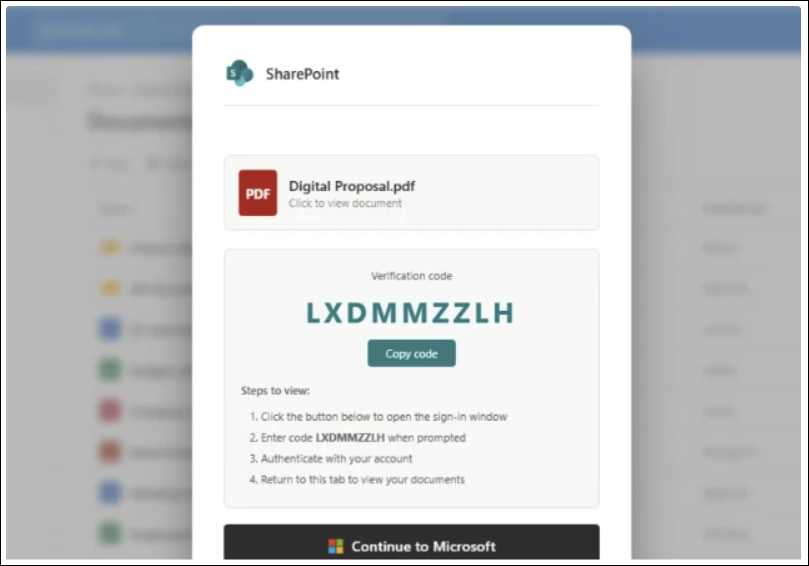
Figure 1: Example lure
Following initial access, Arctic Wolf observed cases in which the threat actor created malicious inbox rules within Microsoft 365. The threat actor configured rules that automatically moved emails containing keywords such as “spam,” “phish,” “click,” “link,” and “SharePoint” to a separate folder and marked them as read. This behavior effectively suppressed security-related notifications and user warnings, enabling the threat actor to maintain access while reducing the likelihood of detection.
In some cases, following token acquisition, the threat actor would use the authenticated session to register an additional device within the victim’s Microsoft environment. This step extended access beyond the initial token by establishing a trusted device association tied to the compromised account.
Three Servers, One TLS Fingerprint
Beginning with a pivot on the IP address 216.203.20[.]95 surfaced during a review of network artifacts associated with this campaign, we identified a Kali365 Live panel as well as additional related infrastructure.
| IP Address | Host | Port | Role |
| 216.203.20[.]95 | Origin for v2.kali365[.]xyz
Hostname: duemineral[.]uk* |
8443 | Panel front door |
| 162.243.166[.]119* | DigitalOcean | 8443 | Sibling instance |
| 199.91.220[.]111 | Cloud Hosting | 8443 | Sibling instance |
*First observed by Push Security and attributed to the CLURE kit
NOTE: 162.243.166[.]119 has been attributed to the CLURE kit by Push Security, follow on research published by Coralogix attributes the IP address to EvilTokens infrastructure.
All three run the same deployment shape: a reverse proxy on TCP/8443 that terminates TLS with the shared certificate and forwards to whichever phishing domain the operator currently has active. We have no evidence that any one of these three IPs is the master-admin origin as opposed to a reseller-tier or client-tier instance. Given the panel structure documented below (admin → agent → client), the three-way symmetry is more consistent with a per-tier or per-region deployment pattern than with redundancy of a single command and control.
Kali365 Live Affiliate Panel
Static analysis of a production React bundle served from v2.kali365[.]xyz indicates a purpose‑built phishing frontend designed to support OAuth device‑code authorization abuse and AitM reverse-proxy capture. The panel is offered as a multi‑tenant service to threat actors and consolidates campaign preparation, credential capture, and post‑compromise activity into a single platform.
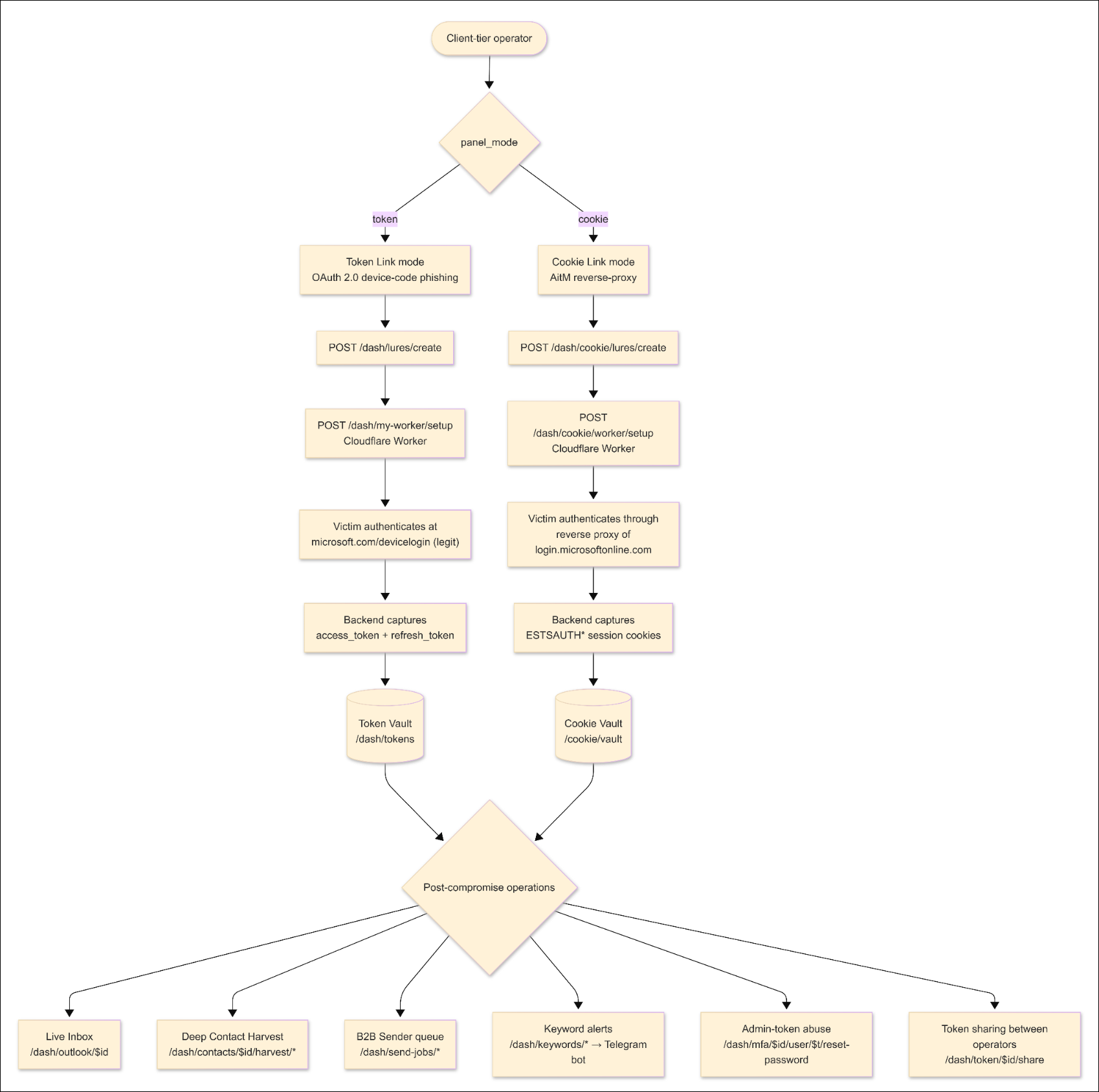
Figure 2: Panel architecture (Click to enlarge).
Kali365 operates as a three-tier, multi-tenant PhaaS platform.
Admin Tier: Kit author
- Provides global oversight, including user and reseller management and audit visibility across all tenants
Agent Tier: Reseller
- Provisions and manages downstream client tenants
Client Tier: Paying affiliate
- Conducts phishing campaigns and post-compromise activity
Each tenant can apply custom branding (panel name, colors, and themes) via the /dash/branding endpoint, resulting in visually distinct panels backed by the same functionality.
Affiliate Onboarding and Account Model
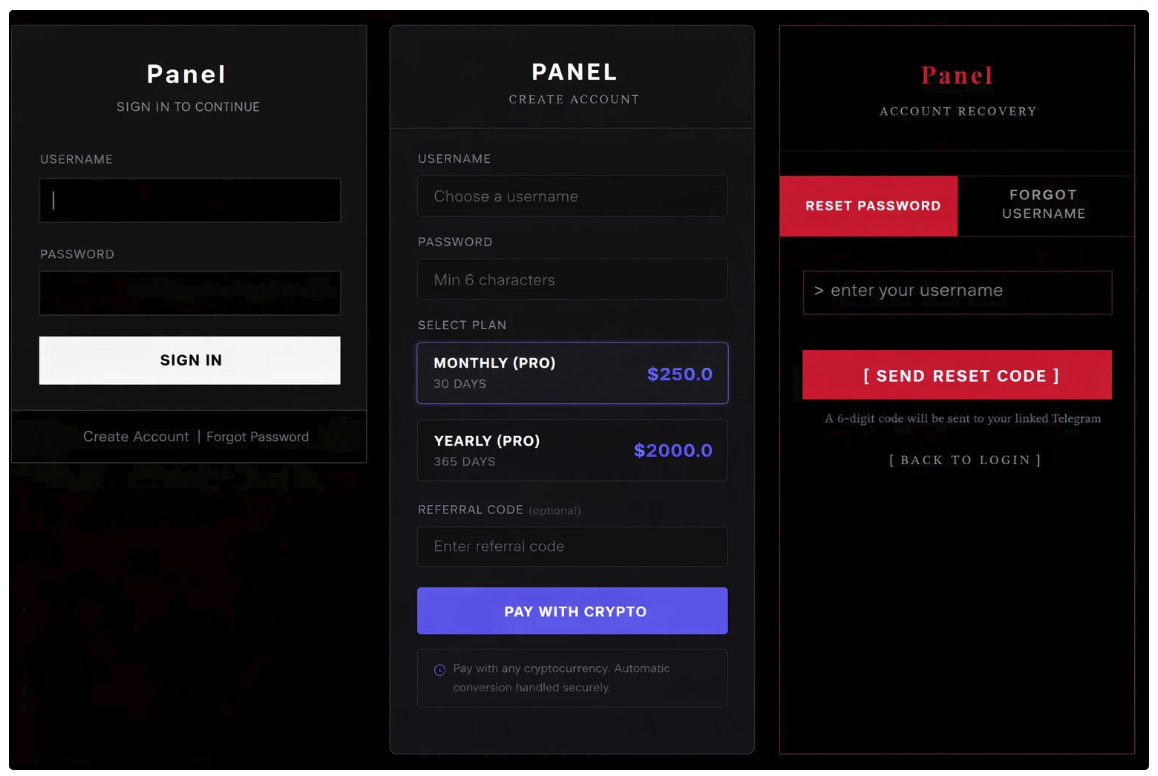
Figure 3: Kali365-live Sign In, Account Creation, and Recovery.
During the initial account provisioning, Kali365 affiliates complete a one‑time setup process that includes:
- Subscription payment via Trocador (non‑KYC cryptocurrency processor)
- Self-serve signup page exposes pricing table directly: $250 for 30 days, $2,000 for 365 days
- Deployment of threat actor‑controlled Cloudflare Workers
- Configuration of a personal Telegram bot used for alerts and account recovery
Authentication to the panel uses HTTP‑only session cookies set server‑side; no OAuth tokens, JWTs, or Microsoft credentials are stored or processed in the frontend bundle. Notably, each tenant is represented as a unique entry in the panel’s database keyed by a Telegram chat_id. Account recovery and password reset workflows resolve via Telegram chat rather than email, making Telegram the primary identity anchor for affiliate accounts.
Lure Generation
Once onboarding is complete, Kali365 enables affiliates to rapidly generate branded phishing lures impersonating common enterprise services such as Adobe Acrobat Sign, DocuSign, and SharePoint. The panel exposes a modular lure‑generation system that allows threat actors to produce hundreds of distinct variants by mixing language localization, presentation layout, Microsoft‑ecosystem impersonations, and multiple document formats.
- Languages: English, Spanish, French, German, Portuguese, Italian, Dutch, Japanese, Korean, Chinese, Arabic, Turkish, Polish, and Russian
- Layouts: Enterprise (mimics corporate-style interface), Split (two-panel layout), and Modal (popup or card-style interface)
- Design Themes: 34 options split into two tiers, a free tier (broad workforce targeting) and a Pro tier (admin/privileged user targeting)
- Lure Types: PDF, Word, Excel, and PowerPoint
The panel backend renders an HTML phishing page based on the selected configuration and hosts it via the affiliate’s Cloudflare Worker deployment. Affiliates can optionally generate AI‑assisted email templates and convert HTML lures into PDF attachments for delivery.
Hardcoded Email Subject Lines
The lures use realistic subject lines drawn from eight hardcoded email templates defined in the panel.
- SharePoint – Document Shared: {sender_name} shared a file with you
- OneDrive – File Shared: {sender_name} shared “Document” with you
- Teams – New Message: {sender_name} sent a message in [[company]]
- Microsoft 365 – Voicemail: Voicemail from {sender_name} – [[date]]
- DocuSign – Signature Required: {sender_name} requested your signature
- Invoice Notification: Invoice #INV-[[date]] for [[company]]
- Adobe Acrobat Sign – Agreement: Action required: [[company]] agreement from {sender_name}
- Account Security Notification: Account notification for [[email]]
Device Code Mode
In device code mode, victims are redirected to an obfuscated landing page that is designed to only render in a real browser session. Upon page load, the Kali365 backend dynamically generates a legitimate Microsoft OAuth device code and displays it to the victim alongside instructions to authenticate at microsoft.com/devicelogin.
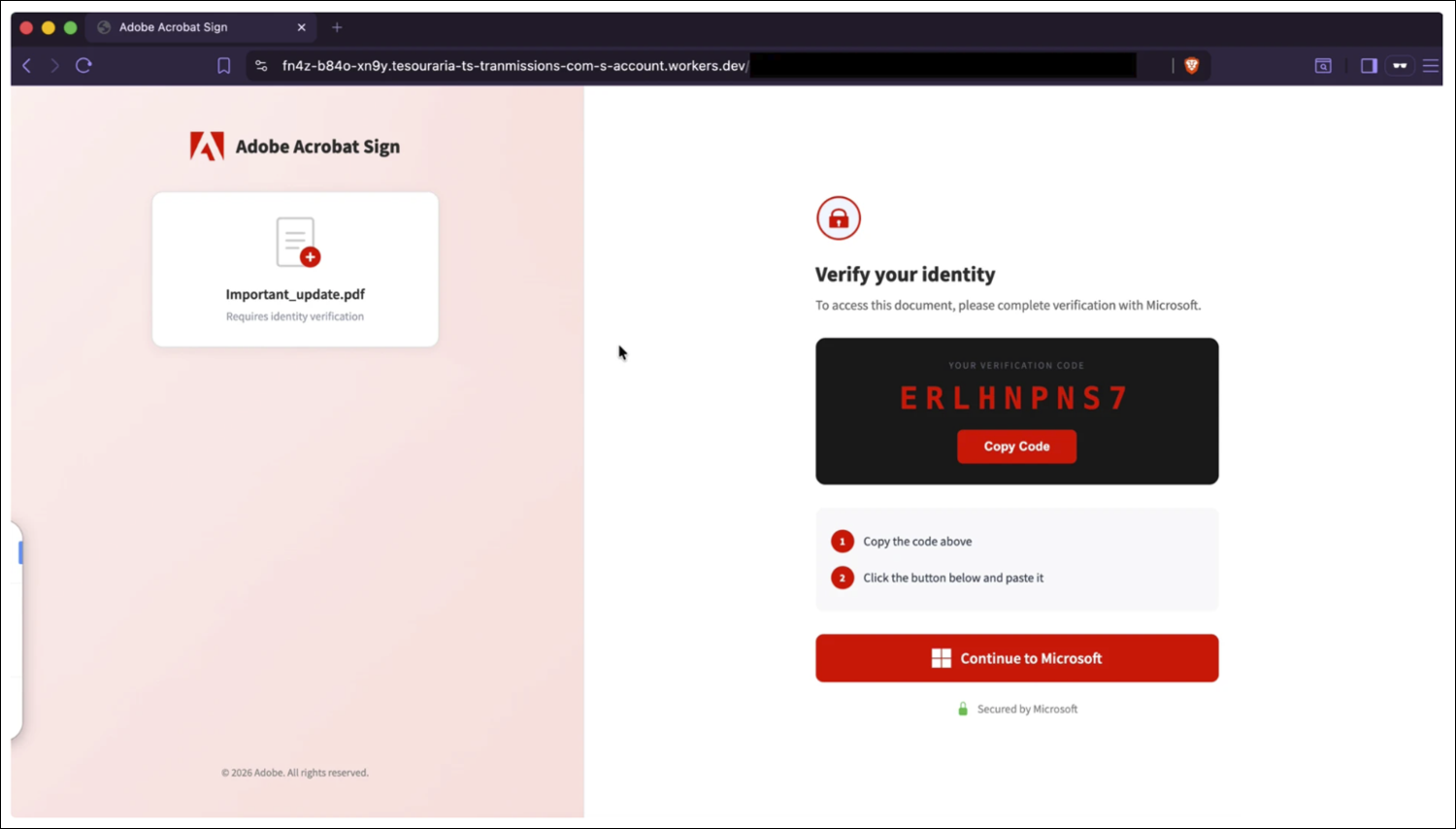
Figure 4: Adobe-themed landing page.
The victim completes authentication, including MFA, on Microsoft’s real infrastructure. Resulting OAuth access and refresh tokens are then captured by the Kali365 backend, stored server-side, and surfaced in the panel via token management endpoints. Captured tokens can be shared with additional affiliates, allowing reuse without participating in the initial lure delivery.
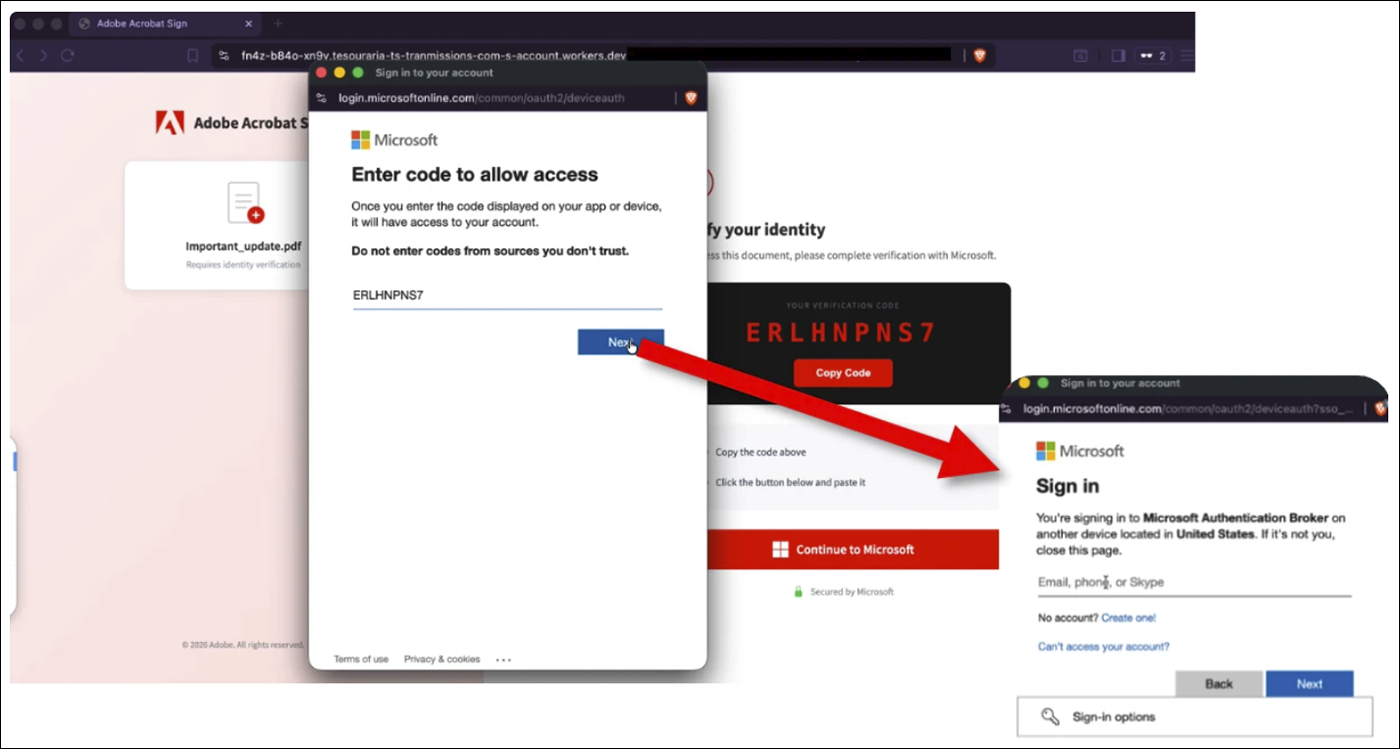
Figure 5: Authentication flow.
These tokens provide immediate and persistent access to Microsoft 365 services and enable a full post‑compromise workflow, including mailbox access, contact harvesting, lateral phishing, keyword monitoring for BEC, and administrative actions if the captured token corresponds to a Microsoft 365 account with sufficient privileges.
Cookie Link Mode
Cookie Link mode in Kali365 is an AitM session capture workflow that is architecturally and operationally separate from the device code flow. In this mode, affiliates create a cookie‑based lure that routes victims through threat actor‑controlled infrastructure deployed using the panel’s Cloudflare Worker functionality. When a victim interacts with the lure, their browser is transparently proxied through this infrastructure, which forwards requests to a real Microsoft login experience while relaying responses back to the victim. The victim performs a normal interactive sign‑in, including username, password, and MFA, without seeing any obvious errors or suspicious prompts.
During this proxied login, the threat actor‑controlled infrastructure captures authenticated browser session information, including session cookies and related session artifacts issued after successful authentication. These captured sessions are stored in the Kali365 panel under the /dash/cookie/* workflow, separate from the OAuth token store used in device code mode. The panel exposes functionality to list captured cookie sessions, extract underlying tokens associated with those sessions, and generate injectable scripts that allow affiliates to replay authenticated browser sessions in their own environment.
Device Code Mode vs. Cookie Link Mode
| Aspect | Device Code (Token) | Cookie Link (AitM) |
| User interaction | Victim enters code on Microsoft.com | Victim logs in normally |
| Credentials entered | Yes (to Microsoft site, not lure) | Yes (through proxy) |
| MFA | Completed legitimately | Completed legitimately |
| What’s captured | OAuth access and refresh tokens | Browser session cookies and tokens |
| Persistence surface | Token‑based | Session + token‑based |
| UI endpoints | /dash/tokens/* | /dash/cookie/* |
Device code mode hijacks authorization, cookie mode hijacks an authenticated web session.
Desktop Application
Beyond the web-based panel, Kali365 promotes a downloadable Electron‑based desktop client for Windows and macOS that functions as a packaged client for the affiliate panel. The application provides live visibility into newly captured OAuth tokens and embeds the panel’s Graph‑backed mailbox interface for interacting with compromised accounts.
When used, the desktop client accesses Microsoft services using the distinct User‑Agent string kali365-live/1.0.0, a high‑confidence indicator of Kali365 activity. The desktop application does not perform token capture itself and exists solely as an affiliate convenience layer over existing backend functionality.
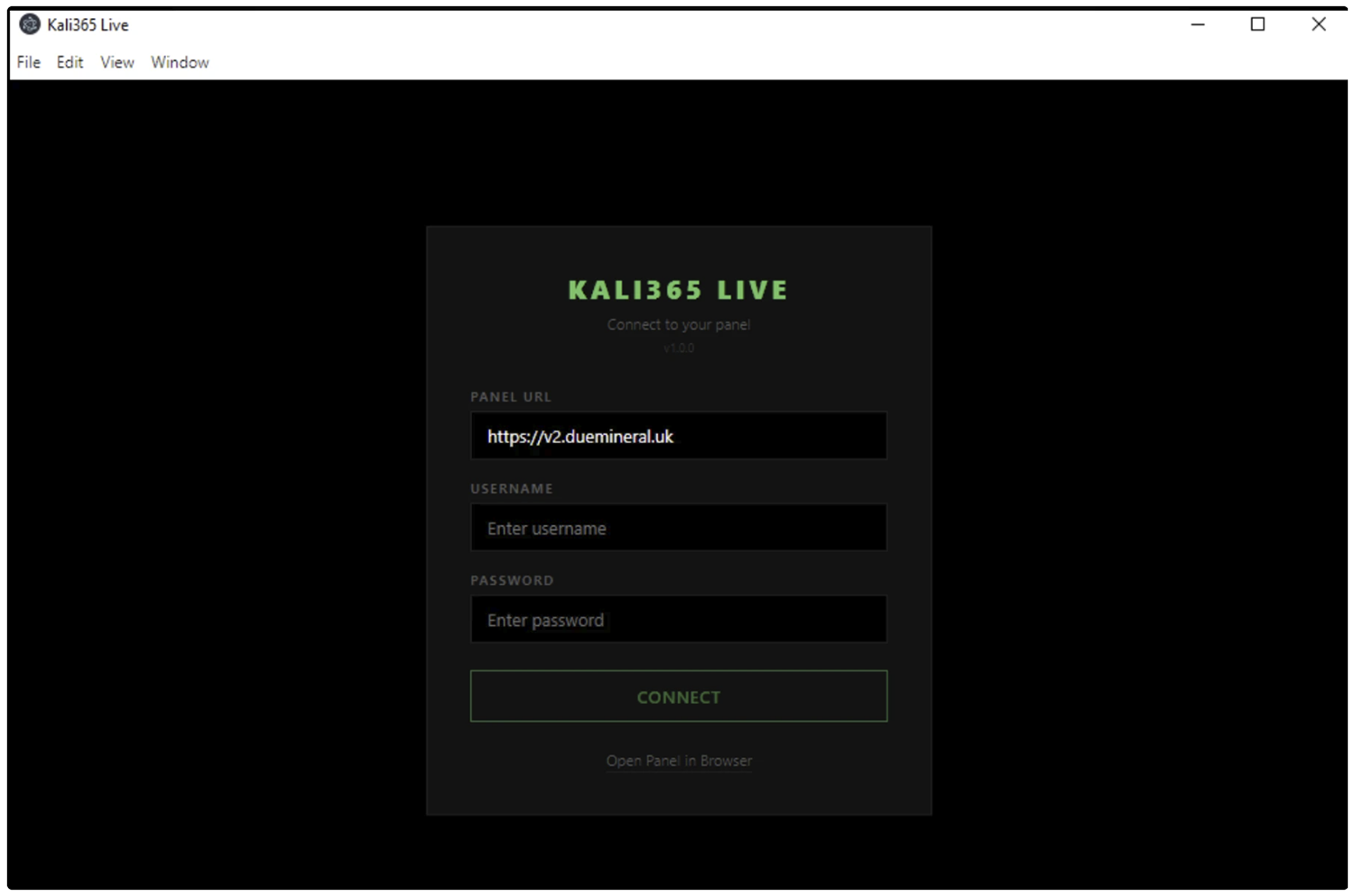
Figure 6: Kali365 live desktop application.
Recommendations
Block Device Code Flow Where Not Required
Arctic Wolf strongly recommends blocking Device Code Flow using Conditional Access (CA) policies where not explicitly required. MDR Customers can request a spot check from their security engineer to identify sign-ins using the Device Code Flow authentication method.
- Create a CA policy targeting “All users” → “All cloud apps” → Conditions: Authentication flows → Device code flow → Block.
If device code flow is required for specific scenarios (e.g., conference room devices), restrict it by:
- Limiting to specific network locations (trusted IPs)
- Limiting to specific device platforms (e.g., Android only for meeting room devices)
- Limiting to specific user groups (service accounts for IoT/signage)
Additionally, enable sign-in risk policies via Microsoft Entra ID Protection to detect anomalous or suspicious sign-ins.
Implement Security Awareness Training
Arctic Wolf strongly recommends implementing comprehensive security awareness training to equip users with the skills needed to quickly identify and report suspicious activity, including the tactics observed in this campaign.
Arctic Wolf offers several phishing-focused modules within our Arctic Wolf Managed Security Awareness® product to help users recognize and respond to the types of threats outlined in this bulletin.
Acknowledgements
Arctic Wolf Labs would like to acknowledge and thank our Security Services team for their role in identifying and subsequently investigating the earliest intrusions associated with this campaign.
Indicators of Compromise
| Type | Value | Notes |
| IP Address:Port | 216.203.20[.]95:8443 | Origin for v2.kali365[.]xyz |
| IP Address:Port | 162.243.166[.]119:8443 | DigitalOcean; 265 DNS associations |
| IP Address:Port | 199.91.220[.]111:8443 | SSL-pivot sibling |
| SHA-256 Hash | 883d5d4a73b0ac8cf4f78fe46d8f4e76e21508872836f2b439af2de4a205128e | SSL Certificate hash observed across IP addresses |
| Hostname | v2.kali365[.]xyz, kali365[.]xyz, api.kali365[.]xyz | Kali365 Live panel |
| User-Agent | kali365-live/1.0.0 | Electron client (master-admin-tier); user-agent observed by Coralogix in an April EvilTokens campaign. |
| User-Agent | python-requests/2.31.0 | Backend egress in campaign context |
| HTML_Phishing_Page | 09bb7e568e573497e22bfa3f36d71fe9d104899826608affedb25d988f391c85 | Reference file |
| HTML_Phishing_Page | 2fa6fc2199d3be55e240500d87e4484f39b9315bf336be25434f6716b8d28ec8 | Reference file |
References
- Push Security: https://pushsecurity.com/blog/device-code-phishing
- Coralogix: https://coralogix.com/blog/evil-token-ai-enabled-device-code-phishing-campaign/
- Sekoia: https://blog.sekoia.io/new-widespread-eviltokens-kit-device-code-phishing-as-a-service-part-1/
- Sekoia: https://blog.sekoia.io/eviltokens-an-ai-augmented-phishing-as-a-service-for-automating-bec-fraud-part-2/
Additional Arctic Wolf Resources
- Arctic Wolf’s Free Threat Intelligence Newsletter: Threat Pulse Community Edition
- Arctic Wolf Blog
- Arctic Wolf Tech Den
