


Key Takeaways
- Arctic Wolf is tracking an active, widespread email-driven phishing campaign that uses adversary-in-the-middle (AiTM) techniques to compromise Microsoft 365 accounts, identify personnel involved in financial workflows, and collect related email.
- The campaign uses residential proxies to disguise malicious sign-ins as ordinary consumer traffic. Automated activity maintains compromised sessions at approximately eight-hour intervals.
- Although the campaign generally avoids traditional business email compromise (BEC) behaviors, its automated tooling produces durable behavioral detection signals.
- The campaign affects organizations across multiple sectors and regions and shares characteristics with the “Payroll Pirates” activity cluster Microsoft tracks as Storm-2755.
Introduction
Arctic Wolf is tracking an ongoing Microsoft 365 phishing campaign affecting healthcare, education, manufacturing, government, professional services, and other sectors across the United States, Canada, and Europe. In July 2026, we observed hundreds of organizations being targeted by email, with successful intrusions identified across a broad range of environments.
The operation uses voicemail-themed phishing emails to direct victims to adversary-in-the-middle (AiTM) pages that proxy the genuine Microsoft authentication flow, even when multi-factor authentication (MFA) is enabled. Once access is established, the actor quietly maintains compromised sessions and collects email associated with personnel involved in financial workflows.
This campaign shares significant technical and behavioral overlap with the “Payroll Pirates” activity cluster Microsoft tracks as Storm-2755, as well as related activity documented by Security Risk Advisors earlier this year. Arctic Wolf’s investigation identified affected individuals across multiple geographic regions, suggesting a wider scope of targeting than originally reported.
This article traces the campaign’s path from phishing delivery through AiTM authentication and account compromise. Our analysis reveals how the toolkit fingerprints potential victims and maintains access to compromised accounts through rotating residential proxies. We also highlight behavioral detection opportunities that remain durable even as the campaign rotates its domains and proxy infrastructure.
Technical Details
Initial Access: Phishing Lure and Redirect Chain
The threat actors used phishing emails impersonating an automated call notification service and directing recipients to a fraudulent voicemail portal. The lures used a Microsoft logo and fabricated caller ID, date, duration, and reference number details to create urgency and make the notification appear legitimate.
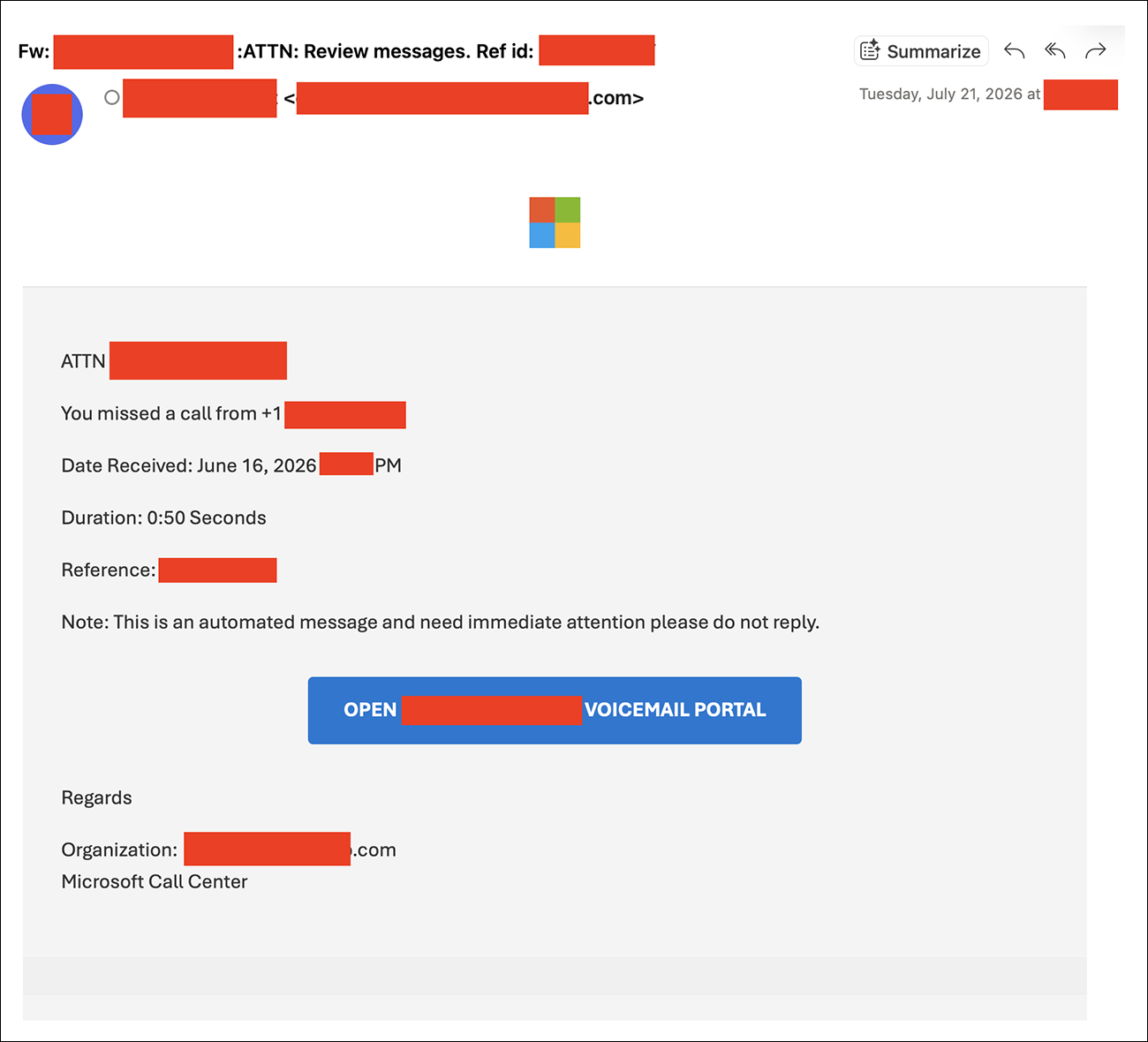
Figure 1: Redacted phishing email showing the voicemail notification lure with prominent “OPEN [Organization] VOICEMAIL PORTAL” call-to-action button.
The subject line follows a consistent format across observed samples:
[Organization] :ATTN: Review messages. Ref id: [random string]
When a recipient clicks on the “OPEN [Organization] VOICEMAIL PORTAL” link, a chain of redirects ultimately leads to a threat-actor-controlled domain operating as an AiTM proxy.
An example phishing link delivered via phishing emails is shown below, with the URL decoded for legibility:
https[:]//meet.google[.]com/linkredirect?dest=https[:]//www.google[.]com/url?q=amp/adservice[.]google.com.ph/ddm/clk/424929466;226923624;r;u=ds&sv1=64195420186&sv2=3261659123742877&sv3=6702577448695742699&gclid=EAIaIQobChMIurHiwbHn8gIVBZ53Ch2TZAIsEAQYASABEgKAL_D_BwE;?//s3[.]us-east-1.amazonaws.com/amzn-5646353653563view/url
The link uses a multi-stage redirect chain that abuses several legitimate services to evade reputation-based filtering.
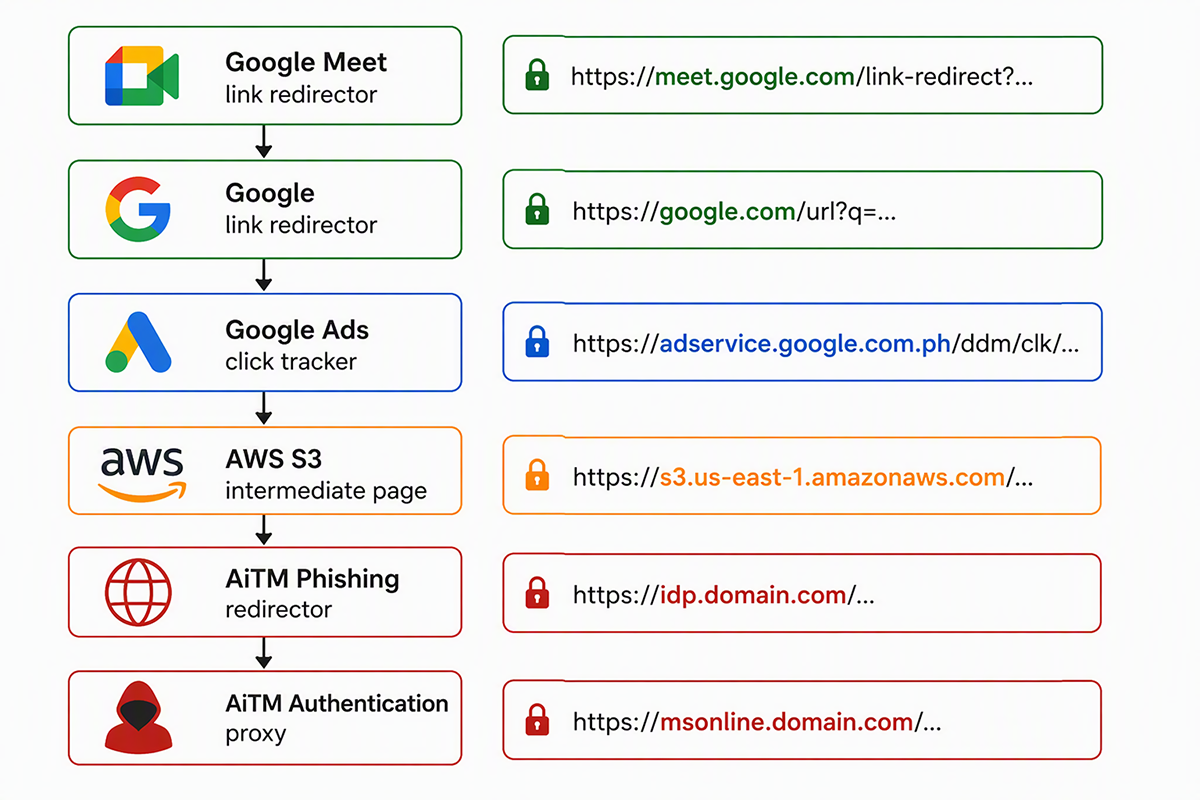
Figure 2: Multi-stage redirect chain using Google Meet, Google Ads, and AWS S3 infrastructure to route victims to an adversary-in-the-middle (AiTM) phishing proxy.
The chain begins with a Google Meet linkredirect URL, and continues through Google’s outbound-link infrastructure before reaching a Campaign Manager /ddm/clk dynamic click tracker. In the activity we observed, the destination embedded in the tracker URL pointed to an HTML object hosted in an Amazon AWS S3 bucket. The S3-hosted page then redirected the victim to the campaign’s AiTM phishing infrastructure.
DNS telemetry corroborated this sequence. During observed phishing activity, resolution of Google Ads-related domains, including ogads-pa[.]clients6[.]google[.]com, ep1[.]adtrafficquality[.]google, and ep2[.]adtrafficquality[.]google, was followed by resolution of a newly registered phishing domain, typically within the same second.
The Google Meet redirect chain was not exclusive to the AiTM toolkit analyzed in this campaign. Arctic Wolf identified substantially similar URLs in public sandbox submissions that reused Campaign Manager tracker identifiers but ultimately delivered other AiTM kits such as EvilTokens, Sneaky 2FA, or FlowerStorm. Differences in the destination infrastructure, page appearance, and source code indicate these were separate downstream toolkits. The overlap may reflect shared or reused delivery infrastructure, but it does not establish a common operator.
AiTM Toolkit Analysis
Arctic Wolf Labs analysis revealed phishing redirects followed a consistent two-stage structure. A redirector, often hosted on an idp. subdomain, returned an HTTP 302 response that sent victims to the AiTM authentication proxy. Proxy domains commonly used Microsoft-themed subdomains such as mslogin., msonline., and msauth. Arctic Wolf also identified a separate naming pattern using misspelled office subdomains, including office.ofrecie[.]com.
| Redirector Domain Examples | Authentication Proxy Domain Examples |
| idp[.]keyreniao[.]com | mslogin[.]milocaroline[.]com |
| idp[.]korminel[.]com | msonline[.]logicalineonline[.]com |
| idp[.]kualabemo[.]com | msauth[.]monlinelogicaline[.]com |
Table 1: A selection of recently used redirector domains and their corresponding destination AiTM authentication proxy domains.
During our analysis, we observed an Ubuntu Apache redirector sending victims to the authentication proxy through an HTTP 302 response. On first visit, the proxy issued a second redirect to /st_58200519/class_identifier.php, a fingerprinting endpoint on the same domain. This stage was skipped when fingerprinting had already recently been completed.
Recently active redirector and proxy domains were commonly hosted on Hostinger and were fewer than 10 days old at the time of use. We also identified older domains that departed from the newer naming patterns but exposed the same fingerprinting path, linking them to the toolkit and expanding its known infrastructure footprint.
The AiTM authentication proxy root and fingerprinting endpoint were both served over HTTP/2 and returned server: openresty/1.31.1.1 in their HTTP response headers. OpenResty is an nginx-based web platform commonly used to implement application gateways and reverse proxies. The endpoints returned different x-powered-by values: Express for the proxy root and PHP/8.2.32 for the fingerprinting endpoint.
These observations suggest that OpenResty acted as a common frontend, routing authentication traffic to an Express application and fingerprinting requests to a separate PHP component.
| Header | AiTM Proxy Root | Fingerprinting Endpoint | Legitimate Microsoft Sign-in Page |
| server | openresty/1.31.1.1 | openresty/1.31.1.1 | Not present |
| x-powered-by | Express | PHP/8.2.32 | Not present |
Table 2: HTTP response headers distinguish the AiTM authentication proxy and fingerprinting components from the legitimate Microsoft sign-in service.
JavaScript served by the fingerprinting endpoint enumerates properties from major browser objects, including navigator, window, screen, document, location, and console. The collected environment information includes:
- Browser and operating system properties
- Screen and window dimensions
- Browser language and time-zone offset
- Hardware concurrency and WebDriver status
- WebGL vendor and renderer
- Cookie capabilities and browser API availability
The JavaScript serializes the collected fingerprint into a hidden form field and submits it to the PHP endpoint through a HTTP POST request. JavaScript code in the response queries api[.]country[.]is – a free, unauthenticated geolocation API – for the requester’s country code, and stores the result in a rcfh_country cookie with a seven-day expiration. After 50 milliseconds, the script redirects the browser to the proxied Microsoft OAuth authorization endpoint. If geolocation fails, the redirect proceeds without setting the cookie. The source also contains several commented-out debugging statements.
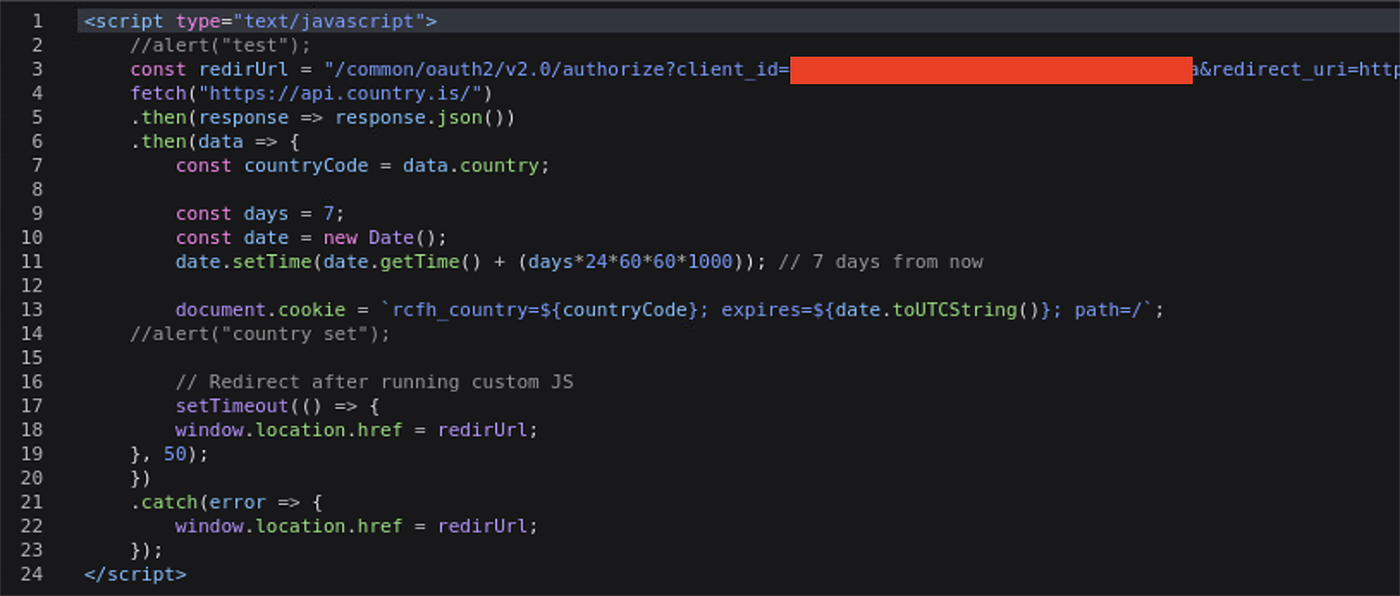
Figure 3: JavaScript returned after browser fingerprint submission queries api[.]country[.]is, stores the resulting country code in the rcfh_country cookie for seven days, and redirects the victim to the proxied Microsoft OAuth authorization endpoint.
During controlled testing, subsequent sign-in activity originated from a residential proxy exit node in the victim’s country. Combined with the timing, scope, and persistence of the rcfh_country cookie, this suggests that a later toolkit component may use the stored country value to select geographically matched proxy infrastructure for later sign-in activity. We could not directly observe the server-side logic that consumed the cookie or confirm that proxy selection was its only purpose.
More broadly, the fingerprinting and geolocation stages appear to serve complementary functions. The collected browser data may help the toolkit identify and filter automated browsers, sandboxes, instrumented environments, and security researchers, while the stored country value may help make subsequent sign-in activity appear more consistent with the victim’s location.
Analysis of the live phishing infrastructure confirmed that the AiTM proxy relayed Microsoft’s genuine authentication flow rather than serving a static credential-harvesting page. The victim’s browser connected to the threat actor-controlled domain, which forwarded authentication traffic to Microsoft in real time. Apart from rewritten URLs that routed requests through the phishing domain, the returned page source closely matched the legitimate Microsoft sign-in content.
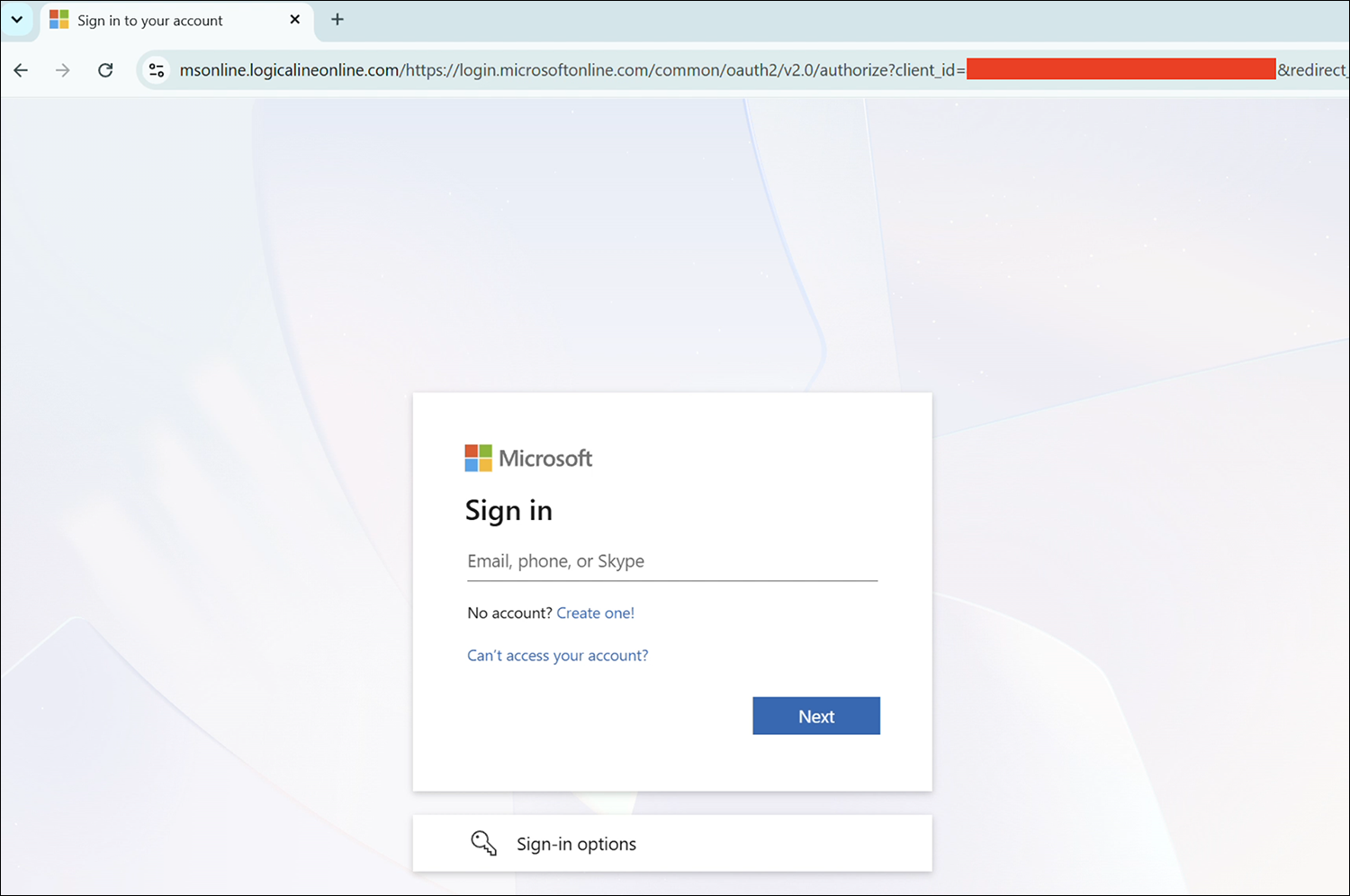
Figure 4: The official Microsoft 365 login page is proxied through an AiTM-generated page.
Following successful authentication, Microsoft returned the authorization code and ID token to the proxy-controlled callback before the victim was redirected to the legitimate Office 365 site. This positioned the proxy to intercept the resulting session material without reproducing or bypassing the MFA challenge.
The proxy embedded legitimate Microsoft authentication endpoints within the path of the attacker-controlled domain. For example:
https[:]//msonline[.]logicalineonline[.]com/https://login.microsoftonline.com/common/GetCredentialType

https[:]//msonline[.]logicalineonline[.]com/https://login.microsoftonline.com/common/login

https[:]//msonline[.]logicalineonline[.]com/https://login.microsoftonline.com/common/SAS/BeginAuth

https[:]//msonline[.]logicalineonline[.]com/https://login.microsoftonline.com/common/SAS/EndAuth
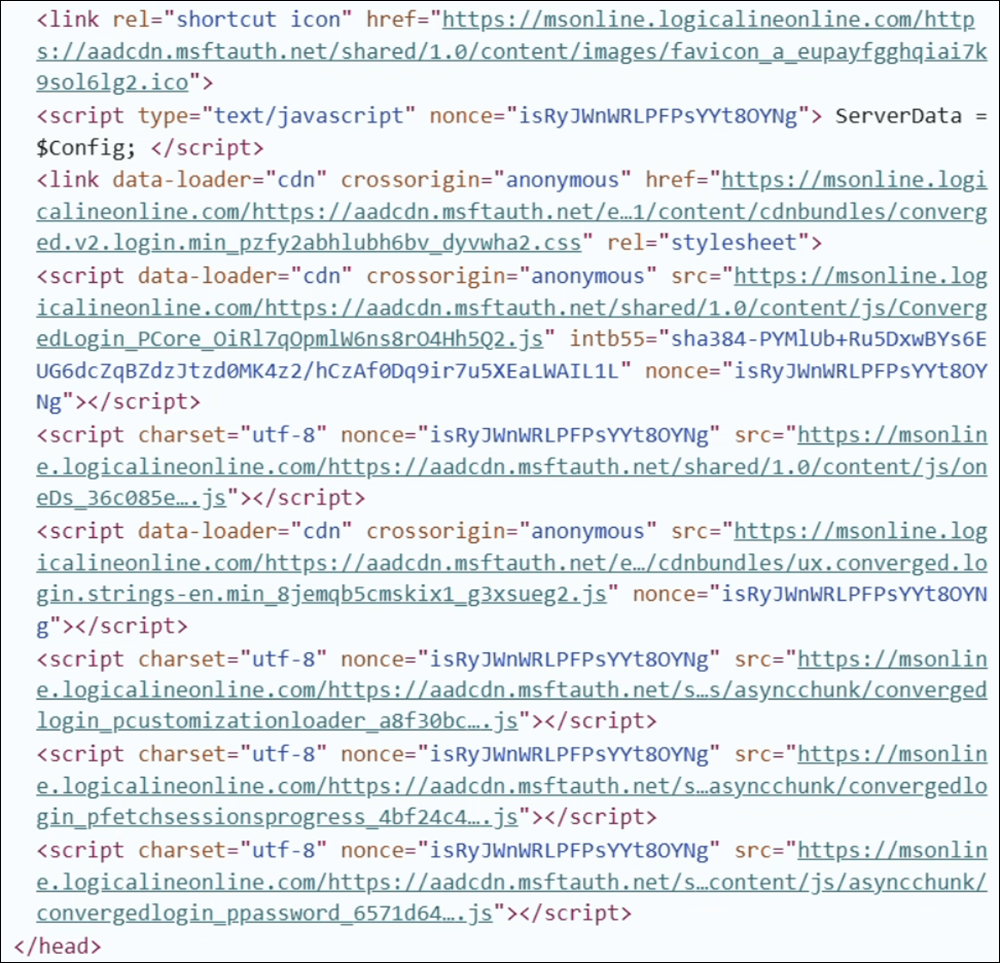
Figure 5: Source HTML excerpt from the captured lure page showing URL rewriting pattern, with AiTM proxy domain prepended to assets hosted on legitimate Microsoft endpoints.
Authentication and Session-Maintenance Activity
Initial suspicious OfficeHome sign-ins from residential proxy infrastructure typically began within several minutes of a victim visiting an AiTM authentication proxy. Source addresses originated from residential ISPs or mobile carriers and were identified by IP intelligence as belonging to residential proxy networks, most commonly anyIP.
Some sequences began with a burst of sign-ins from several distinct residential proxy addresses over a short period, a pattern that was highly anomalous across Arctic Wolf telemetry and inconsistent with legitimate user activity. The initial sign-ins also reported implausible browser and operating-system combinations, including Mobile Safari or Chrome Mobile on Windows 10.
Many sign-in attempts produced error 90014 because the AiTM proxy sometimes initiated the OAuth authorization flow without the nonce parameter used to bind an ID token to a specific authentication session. Microsoft could still process the flow, including MFA, but ultimately rejected the callback because a required parameter was missing. When associated with the first-party OfficeHome application, this error was exceedingly rare across Arctic Wolf’s global Aurora® Managed Detection and Response (MDR) telemetry and strongly associated with campaign activity. However, it was not present in every confirmed intrusion, and some correlated OfficeHome authentications completed successfully.
Typically, 11 to 24 hours after the initial anomalous activity, malicious sign-ins began recurring at eight-hour intervals from rotating residential proxy addresses. These events reported Microsoft Outlook as the client application but used Firefox 131.0, Firefox 151.0, or occasionally Python Requests user agents rather than the expected Edge user agent. The recurring sign-ins retained the same SessionID while the source IP address, ASN, and geographic location changed, providing further evidence that centralized automation was refreshing each compromised session independently.
Individually, these anomalies vary in specificity, but their combination produced a consistent behavioral pattern across affected accounts. Correlating error 90014, implausible browser and operating-system combinations, rapid residential proxy rotation, anomalous Outlook user agents, and the eight-hour cadence each independently and consistently surfaced affected accounts across Arctic Wolf’s global Aurora MDR telemetry. These signals supported detection at multiple points in the intrusion lifecycle, including cases where the initial phishing activity was unavailable to investigators, OfficeHome authentication completed without error 90014, or only the later session-maintenance activity remained visible.
Reconnaissance and Coordinated Mailbox Collection
Consistent with previous reporting on Storm-2755, the threat actor used Microsoft Graph to enumerate tenant users associated with payroll, HR, finance, and administrative functions. The activity included targeted searches across user attributes and broader tenant-wide enumeration. In Microsoft Defender XDR environments, these requests generated “Suspicious Exchange Online Graph Reconnaissance Activity” alerts and typically used the axios/1.18.1 user agent, which was released in June 2026.
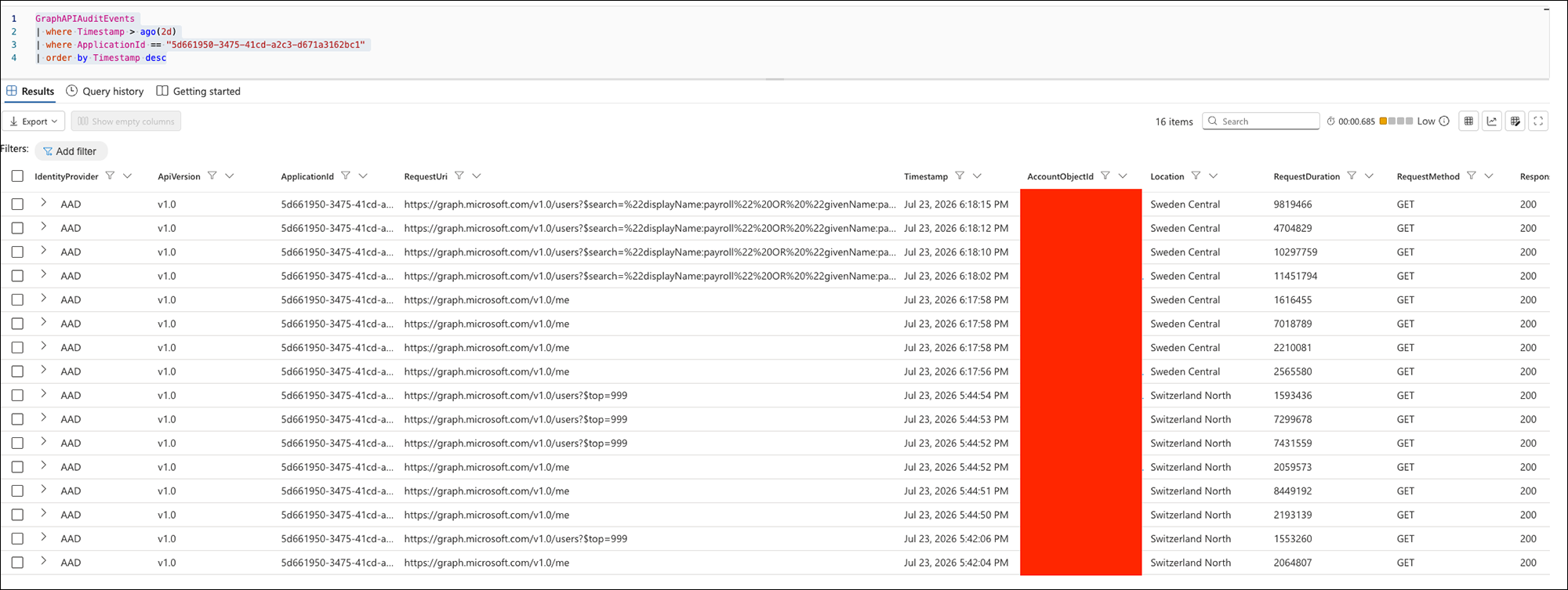
Figure 6: Microsoft Defender XDR Advanced Hunting page showing typical reconnaissance queries performed by the threat actor (Click to enlarge).
The threat actors subsequently accessed messages related to payroll, invoices, payments, banking, benefits, and internal documents. Successful Bind events confirmed that specific messages were opened or retrieved rather than merely enumerated, giving the actors visibility into financial personnel and workflows.
This collection exhibited a distinctive cross-tenant timing pattern: unlike the approximately eight-hour sign-in cadence observed within individual accounts, MailItemsAccessed events from different tenants clustered into short collection windows. In one instance, 18 events across three tenants occurred within 26 seconds; in another, 11 events across two tenants occurred within 43 seconds. This synchronization indicates that centralized infrastructure coordinated mailbox collection across multiple compromised accounts.
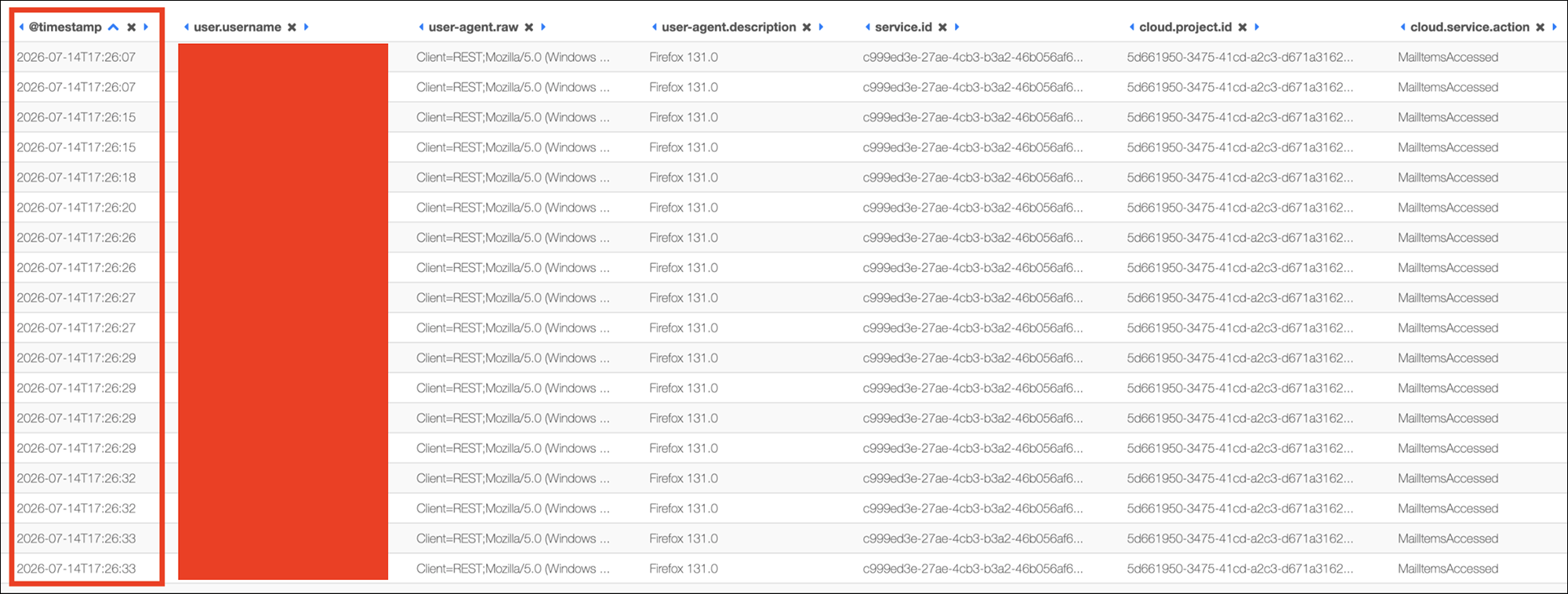
Figure 7: Across three separate tenant environments, malicious MailItemsAccessed activity occurred within the same 26-second collection window (click to enlarge).
The Client App ID and API ID values recorded during this activity are individually associated with legitimate Microsoft services. However, the following combination was uniquely present across Arctic Wolf’s global Aurora MDR telemetry for confirmed compromises where corresponding MailItemsAccessed telemetry was available:
| Field | Value |
| Operation | MailItemsAccessed |
| Client App ID | 5d661950-3475-41cd-a2c3-d671a3162bc1 (Microsoft Outlook) |
| API ID | c999ed3e-27ae-4cb3-b3a2-46b056af63d3 (not documented publicly) |
| User-Agent | Client=REST;Mozilla/5.0 (Windows NT 10.0; Win64; x64; rv:131.0) Gecko/20100101 Firefox/131.0 |
No legitimate instances of this Client App ID or API ID pairing were identified, even when the anomalous user agent values were excluded, making the application and API pairing independently useful for identifying the campaign.
In most investigated intrusions, post-compromise activity remained narrowly focused on session maintenance, reconnaissance, and mailbox collection. We did not observe MFA-method changes, device registration, credential modification, lateral phishing, or evasive inbox rules in most affected accounts. By avoiding these common BEC behaviors, the threat actors limited opportunities for early detection based on account modification or outbound email abuse.
Hands-on-keyboard activity was observed in only a small subset of intrusions in this campaign. In those cases, threat actors created inbox rules that automatically moved messages to Deleted Items and marked them as read. A shared SessionID linked the initial malicious sign-ins, automated token-refresh sign-ins, MailItemsAccessed activity, and subsequent inbox rule creation. Unlike the preceding automation, sign-ins associated with inbox-rule creation were interactive and typically originated from hosting providers, such as AS27176 – Datawagon LLC, rather than residential proxy infrastructure. This distinction suggests that centralized automation handled routine session maintenance, reconnaissance, and mailbox collection, while operators intervened selectively for later account manipulation.
Conclusion
Arctic Wolf has observed a significant number of Microsoft 365 account compromises associated with this campaign over the past several weeks, driven through a repeatable email-driven AiTM workflow.
Using rotating residential proxies, the threat actor quietly maintained stolen sessions, identified personnel involved in financial workflows, and collected relevant mailbox data through automated activity. The delay between initial access and subsequent automation, combined with restrained post-compromise activity, makes the campaign harder to connect to the original phishing event and less likely to trigger existing detections.
Defenders should correlate identity, session, and mailbox access telemetry rather than evaluate individual sign-ins in isolation. This approach provides a more durable way to identify affected accounts, when the initial phishing event was unavailable or the initial authentication completes without a known error.
How Arctic Wolf Protects Its Customers
Arctic Wolf is committed to ending cyber risk, and when active campaigns are identified, we move quickly to protect our customers.
We have leveraged threat intelligence from this campaign to inform new detections in Arctic Wolf® Managed Detection and Response (MDR), actionable reporting and indicators through Aurora® Threat Intelligence, and phishing simulations and training through our Aurora Managed Security Awareness® training program. The Arctic Wolf Security Operations Warranty also provides financial coverage for covered BEC incidents, subject to applicable terms and coverage limits.
As this campaign develops, Arctic Wolf may refine its detections, intelligence, and defensive guidance to address changes in the threat actor’s infrastructure and techniques.
Detection Guidance
Microsoft 365 Unified Audit Logs
- MailItemsAccessed with anomalous AppID and API pairing:
- ClientAppId: 5d661950-3475-41cd-a2c3-d671a3162bc1 AND APIId: c999ed3e-27ae-4cb3-b3a2-46b056af63d3.
- This combination does not appear in legitimate Microsoft Outlook mail access and is a high-fidelity indicator.
- Access type Bind confirms message content was retrieved.
- Note: MailItemsAccessed auditing is part of the standard Exchange mailbox configuration for Office 365 E3/E5 or Microsoft 365 E3/E5 licenses. If you have a different license, check your environment to ensure that this is enabled (see Step 3: Enable Auditing in our documentation).
- Microsoft Graph reconnaissance activity:
- Graph API queries containing searches for user accounts with attributes containing terms such as “payroll,” “hr,” “finance,” “human resources”. The following endpoints were queried:
- https[:]//graph.microsoft[.]com/v1.0/users. See example query. This same endpoint was also queried without specifying attributes via https[:]//graph.microsoft[.]com/v1.0/users?$top=999.
- https[:]//graph.microsoft[.]com/v1.0/me
- Microsoft Defender XDR alert: “Suspicious Exchange Online Graph Reconnaissance Activity”.
- Graph API queries containing searches for user accounts with attributes containing terms such as “payroll,” “hr,” “finance,” “human resources”. The following endpoints were queried:
Microsoft Entra ID Sign-In Logs
Defenders should focus on these high-signal indicators in Entra ID sign-in and audit logs:
- Anomalous Outlook sign-in properties:
- Microsoft Outlook client application with any browser other than Edge.
- Firefox 131.0 specifically, though the detection should be broader (Outlook + NOT Edge). Firefox 151.0 has also been observed in recent activity.
- Periodic sign-in pattern at eight-hour intervals from different geographic locations with the same SessionID.
- Session anomalies:
- Single SessionID appearing across multiple ASNs and geographic regions within a short timeframe.
- Residential ISP IP addresses flagged as proxy infrastructure by IP intelligence services (such as Spur).
- Error code 90014 on first-party applications:
- errorCode: 90014 combined with appDisplayName: OfficeHome.
- Particularly when paired with user-agent/OS mismatches (e.g., Mobile Safari on Windows10)
- This error is exceedingly rare for legitimate first-party Microsoft applications, but was not present in every confirmed intrusion.
Note: Because much of this activity appears in non-interactive sign-in telemetry, environments that do not retain or ingest non-interactive Entra ID sign-ins may miss the recurring token-refresh pattern.
Network and Endpoint Telemetry
- Email-based indicators:
- Inbound messages matching the voicemail lure subject format: [Organization] :ATTN: Review messages. Ref id: [string].
- URLs containing multi-layered redirects through google.com/linkredirect to adservice.google.com.ph/ddm/clk/</span< destinations.
- Links resolving to S3 bucket URLs (e.g., us-east-1.amazonaws.com) as intermediate stages.
- Network signatures:
- HTTP response headers server: openresty/1.31.1.1 and x-powered-by: ExpressM on domains impersonating Microsoft login pages.
- Requests to paths containing /st_58200519/class_identifier.php.
- URL patterns embedding Microsoft authentication endpoints within a non-Microsoft domain’s path.
- DNS-based indicators (more valuable when combined):
- Resolution of known phishing domains (see IOC table on our public GitHub).
- Pattern of Google Ads infrastructure resolution immediately followed by resolution of a newly registered domain (e.g., fewer than 30 days old).
- Resolution of api[.]country[.]is in proximity to unfamiliar domain resolution.
Remediation and Hardening Guidance
Immediate Response
If you identify a compromise associated with this campaign:
- Immediately revoke all active sessions for the affected account(s).
- Rotate credentials and re-register MFA for the affected user(s).
- Audit payroll and HR platform activity (e.g., Workday, ADP) for the full suspected dwell period. Direct deposit changes are of particular interest to threat actors in this campaign.
- Review MailItemsAccessed audit logs for the unique API ID pairing described above to scope what data was accessed.
- Hunt for the eight-hour session-maintenance pattern across other accounts in the environment to identify additional compromises.
For organizations that need support with investigation or remediation, Arctic Wolf’s Incident Response team is ready to assist.
Hardening Recommendations
- Deploy phishing-resistant MFA. Phishing-resistant authentication methods such as FIDO2 security keys, Windows Hello for Business, and certificate-based authentication are designed to bind authentication to the legitimate service and prevent the credential-and-session relay technique used in this campaign.
- Restrict sign-ins to managed devices via Conditional Access. Properly configured Conditional Access policies requiring compliant or Microsoft Entra hybrid-joined devices can prevent replay of stolen sessions from the threat actor’s unmanaged infrastructure. Organizations should review exclusions, legacy authentication paths, and application coverage to ensure the policy is enforced consistently.
- Enable Continuous Access Evaluation (CAE). CAE allows near-real-time revocation of sessions when risk conditions change, reducing the window during which stolen tokens remain valid.
- Monitor for non-interactive sign-in telemetry. Some organizations have disabled non-interactive sign-in log ingestion, which blinds detection systems to the periodic token refresh activity that characterizes this campaign. Ensure this telemetry is enabled and ingested.
User and Employee Awareness:
- Arctic Wolf strongly recommends implementing comprehensive security awareness training to equip users with the skills needed to quickly identify and report suspicious activity, including the tactics observed in this campaign.
- For those without the time or resources needed to set up a security training program from scratch, Arctic Wolf offers several phishing-focused modules within our Arctic Wolf Managed Security Awareness® training program to help users recognize and respond to the types of threats outlined in this bulletin.
Appendix
For additional Appendix sections referenced in this report, including Indicators of Compromise (IOCs) and MITRE ATT&CK® mapping, please see our public GitHub repository.
Legal disclaimer: Attribution reflects Arctic Wolf Labs’ assessment as of the report period and may evolve with new evidence. References to threat actor identity, nexus, and intent are analytical judgments, not statements of legal fact. This alert is provided for informational purposes only and does not constitute a guarantee of detection or prevention. Defensive effectiveness varies by environment, configuration, and available telemetry.
Additional Arctic Wolf Resources:
- Arctic Wolf’s free Threat Intelligence newsletter: ThreatPulse Community Edition
- Arctic Wolf Tech Den
- Arctic Wolf Blog
About Arctic Wolf Labs
Arctic Wolf Labs is a group of elite security researchers, data scientists, and security development engineers who explore security topics to deliver cutting-edge threat research on new and emerging adversaries, develop and refine advanced threat detection models with artificial intelligence and machine learning, and drive continuous improvement in the speed, scale, and detection efficacy of Arctic Wolf’s solution offerings.
Arctic Wolf Labs brings world-class security innovations to not only Arctic Wolf’s customer base, but the security community at large.